5 Best HR Management Software for BPO Companies 2027
An agent’s shift ends at 4 a.m. Their attendance record says 3:42 a.m. The supervisor remembers approving overtime, but the approval is missing. Payroll is due, and HR must piece together what happened.
Multiply across hundreds of agents, rotating shifts, high attrition, and frequent new-hire batches. Attendance gaps, incomplete approvals, and manual reconciliations quickly consume hours every pay cycle.
BPO companies need reliable employee records, accurate time tracking, and clear approval processes. Contact centers may also require specialist tools for forecasting call volumes and planning agent schedules.
The right software depends on the problems your operation needs to solve.
This guide compares five options for HR Management Software for BPO Companies, highlights their real differences and trade-offs, and shows what to test before you buy.

5 Best HR Management Software Options for BPO Companies
A product built for employee records won't necessarily help a contact center forecast call volume. Similarly, hr software that tracks employee activity may not handle payroll or manage leave requests. These differences matter when you're comparing platforms that all claim to support workforce management.
The options below serve different purposes. Some focus on core HR processes; others bring together several workforce functions, and specialist platforms address contact-center scheduling and forecasting. Compare each product against the work you need to handle, along with its limitations.
Here are several platforms worth evaluating, depending on your BPO's requirements.
Which platform should you consider?
- StaffViz: For businesses prioritizing attendance, work-time tracking, and productivity reporting.
- BambooHR: For businesses focused on employee records and HR administration.
- Rippling: For businesses connecting HR with other workforce applications.
- Connecteam: For teams needing scheduling and operational communication.
- NiCE: For contact centers requiring specialized staffing forecasts and agent scheduling.
See If StaffViz Fits Your BPO
StaffViz brings together attendance tracking, time records, shift scheduling, payroll management, and productivity reporting. Its website also lists activity monitoring and overtime reporting capabilities.
If your team spends too much time reconciling working hours or lacks visibility into employee activity, these are the features worth evaluating first.

Which Type of Software Does Your BPO Need?
The best starting point is the operational problem you need to solve. Different software categories address different parts of workforce management.
Some platforms cover several of these areas, while others specialize in one. Before making a decision, ask vendors to demonstrate your actual workflows, including a missed clock-out, an overtime approval, or an unexpected shift change.
The goal is not to buy the most software. It is to stop the same operational problems from consuming your team's time every week.
Key Features to Look for in BPO HR Software
The right HR Management Software should address the workforce challenges your business actually faces. For some BPOs, that means keeping employee records organized. Others need better visibility into working hours, payroll data, or agent availability. Understanding these differences helps you assess which capabilities deserve priority.
1. Attendance Tracking and Time Records
Accurate attendance records help BPO managers keep track of working hours across different shifts. They also give HR a reliable reference when an employee disputes a recorded time or a supervisor questions an attendance entry.
For example, if an agent finishes an overnight shift earlier than expected, HR needs to establish what happened before finalizing the relevant records. A consistent process reduces reliance on emails, spreadsheets, and individual recollections.
2. Shift Scheduling and Leave Management
Employee availability directly affects how a contact center plans its daily operations. An unexpected absence or a last-minute shift change can leave a team short of the people needed to support a client.
Leave management helps organize employee requests and approvals, while scheduling tools help managers assign shifts. Contact centers with fluctuating call volumes may also need dedicated workforce management software to forecast demand and align staffing with expected workloads.
3. Payroll Coordination and Overtime
Payroll problems often begin with incomplete or inconsistent time records. When overtime approvals and attendance data sit in separate systems, HR may need to reconcile the information manually before processing payments.
Connecting these workflows can reduce duplicate data entry and make discrepancies easier to investigate. However, recording working hours is not the same as calculating wages or processing payroll. Some platforms support data transfers, while others provide more extensive payroll functionality.
4. Employee Records and Onboarding
BPO companies may hire large groups of employees to support new contracts or expand existing teams. Without organized records, HR can spend valuable time tracking documents, update employee details, and follow up on incomplete onboarding tasks.
A central employee database makes information easier to maintain and retrieve. Structured onboarding workflows can also help HR coordinate paperwork, internal responsibilities, and the steps new hires must complete before starting work.
5. Workforce Analytics and Productivity
Attendance data shows when employees work, but it does not explain every aspect of their working patterns. Operations leaders may need additional insight to understand how time is spent, identify recurring workflow issues, or assess productivity trends.
Workforce analytics and employee monitoring tools can provide visibility into activity patterns. However, these insights should not be confused with customer satisfaction, service quality, or contact-center performance metrics. Each measures a different aspect of operations.
6. Integration With Existing Systems
Adding another platform should make daily work easier, not create another disconnected source of information. When workforce tools exchange data with payroll, communication, or project management systems, teams can spend less time updating the same information in multiple places.
The value of an integration depends on how it works in practice. Some connections synchronize data automatically, while others require exports or manual intervention. These differences can affect both implementation costs and the amount of ongoing administrative work.
7. Data Security and Employee Privacy
Employee records contain confidential information that should only be accessible to authorized people. This becomes especially important when supervisors, HR teams, and senior managers have different responsibilities.
Access controls help protect employee information, while audit records can provide visibility into changes made within a system. For companies using employee monitoring, clear policies also help employees understand what information is collected and how it is used.
How Do You Choose the Right Features?
Start with the problem you need to solve, then select software that addresses it directly.
- Attendance discrepancies: Prioritize dependable time records and correction of workflows.
- Manual payroll preparation: Examine payroll compatibility and how approved hours are transferred.
- Frequent recruitment: Focus on employee records and onboarding.
- Unclear work patterns: Consider workforce analytics and appropriate monitoring tools.
- Complex contact-center staffing: Evaluate specialist forecasting and scheduling capabilities.
No single platform should be assumed to cover every function. A BPO may need a core HR system, a payroll application, and a separate workforce management or analytics tool. Compare the total workflow, not just the number of features listed on a vendor's website.

Common Mistakes to Avoid When Buying BPO HR Software
Even a capable product can be a poor investment when the buying process overlooks practical constraints. These are the risks worth addressing before signing a contract.
Buying More Than Your Team Can Use
A long feature list can make a product look like a safe choice. In practice, unnecessary modules can increase costs, complicate implementation, and make training harder.
Separate essential requirements for future improvements. Pay for additional capabilities when they serve a clear purpose, not simply because they are available.
Underestimating the Total Cost
The subscription fee may be only one part of the investment. Setup, data migration, employee training, integration work, and ongoing support can all affect the final cost.
Request a breakdown based on your expected number of users and required modules. Also consider the staff time needed to administer the platform after launch.
Accepting a Sales Demonstration as Proof
A polished demonstration does not necessarily show how a platform will perform under your working conditions. Your BPO may have approval chains, overnight schedules, or reporting requirements that the standard demonstration never addresses.
Prepare a small set of realistic scenarios and ask the vendor to work through them. Include an exception, not just a straightforward task. The way a system handles something going wrong can reveal as much as its normal workflow.
Overlooking Data Migration
Moving employee records from existing systems can involve duplicate entries, inconsistent formats, missing fields, and outdated information. These problems can carry over into the new platform if the data is not reviewed first.
Establish which records need to move, who will validate them, and how the business will handle discrepancies. Agree on responsibilities before implementation begins.
Failing to Plan for Adoption
Software only helps employees and managers to use it correctly. If clocking in, requesting leave, or approving changes is confusing, staff may continue relying on informal workarounds.
Plan training around the tasks each group performs. Supervisors may need different guidance from HR administrators, payroll staff, or employees using self-service functions.
Best Practices for Implementing HR Management Software in a BPO
Successful implementation requires a clear plan, accurate data, and involvement from the teams that will use the system.
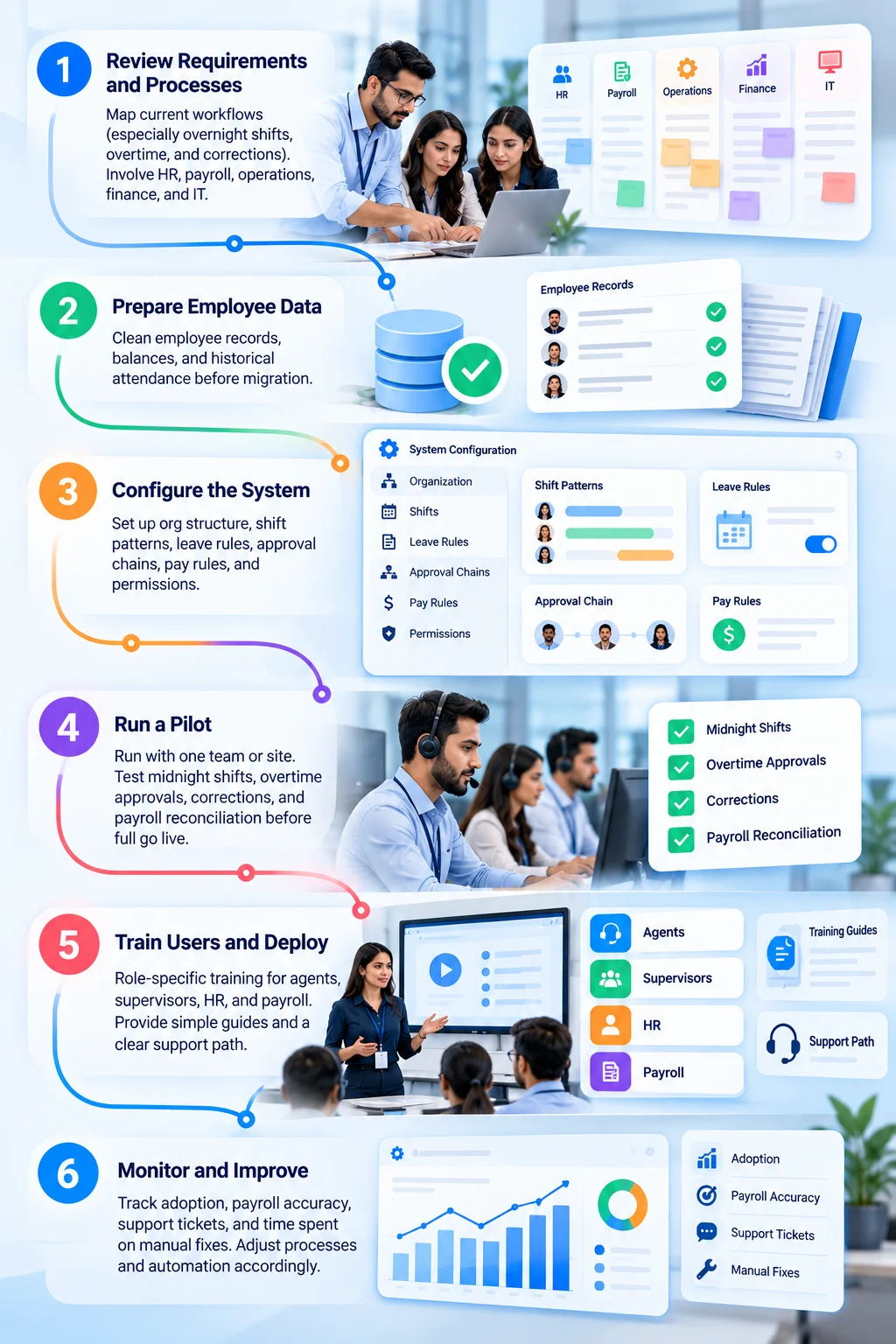
Phase 1: Review Requirements and Processes
Map current workflows (especially overnight shifts, overtime, and corrections). Involve HR, payroll, operations, finance, and IT.
Phase 2: Prepare Employee Data
Clean employee records, balances, and historical attendance before migration.
Phase 3: Configure the System
Set up org structure, shift patterns, leave rules, approval chains, pay rules, and permissions.
Phase 4: Run a Pilot
Run with one team or site. Test midnight shifts, overtime approvals, corrections, and payroll reconciliation before full go live.
Phase 5: Train Users and Deploy
Role-specific training for agents, supervisors, HR, and payroll. Provide simple guides and a clear support path.
Phase 6: Monitor and Improve
Track adoption, payroll accuracy, support tickets, and time spent on manual fixes. Adjust processes and automation accordingly.
How to Choose Between Your Shortlisted Options
Define success clearly (fewer manual corrections, faster onboarding, more reliable staffing vs. demand, etc.). Score two or three platforms against your essential requirements and the demo scenarios above. Compare total cost, support quality, and implementation effort.
Before signing a contract, ask each vendor to demonstrate:
- An employee working across midnight.
- An overtime request and approval.
- A correction to an attendance record.
- A payroll export or integration.
- A report your managers use regularly.
Compare the results, total cost, support, and implementation effort. Choose the platform that handles your real workflows reliably.
Frequently Asked Questions
How much does HR management software cost for a BPO?
Costs depend on employee count, selected modules, integrations, and contract terms. Some vendors publish starting prices, while others provide customized quotes. Request a full cost breakdown before comparing offers.
Can a BPO use separate HR, payroll, and WFM systems?
Yes. Separate systems can work when they exchange data reliably. Check for duplicate entry, synchronization delays, and unclear responsibility for correcting errors.
What should a BPO test before buying HR software?
Test attendance corrections, overnight shifts, overtime approvals, payroll transfers, permissions, and reports using realistic scenarios from your operation.
Is employee monitoring software the same as HR management software?
No. Employee monitoring focuses on activity and productivity visibility. HR software typically manages employee records and administrative workflows. Some platforms combine selected capabilities.
How can a BPO manage employees across countries?
Check country-specific payroll support, local employment requirements, time zones, currency handling, data protection, and the availability of regional support. Do not assume one package covers every country.
Effectively Manage Remote and Hybrid Teams with StaffViz
Enhance team efficiency and collaboration with StaffViz, the ultimate tool for managing remote and hybrid teams.
Talk To Us

Table of Content
- 5 Best HR Management Software Options for BPO Companies
- Which platform should you consider?
- See If StaffViz Fits Your BPO
- Which Type of Software Does Your BPO Need?
- Key Features to Look for in BPO HR Software
- How Do You Choose the Right Features?
- Common Mistakes to Avoid When Buying BPO HR Software
- Best Practices for Implementing HR Management Software in a BPO
- How to Choose Between Your Shortlisted Options
- Frequently Asked Questions