The Complete Employee Record Checklist for Modern HR Teams
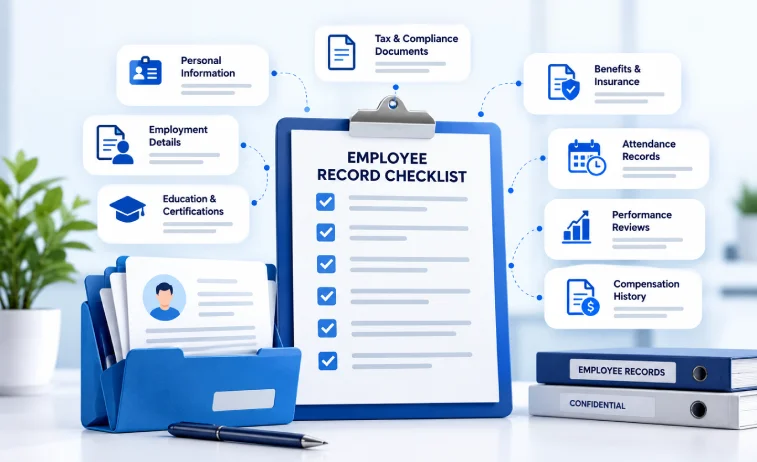
Managing human resource documentation requires precision, clear planning, and strict organization. Every worker who joins your business creates a trail of paperwork. From job applications to tax withholdings, HR managers handle dozens of forms for every individual on payroll.
A single missing file can lead to federal fines during an unexpected labor audit. Disorganized paper folders also waste valuable working hours every single week. Implementing a standardized Employee Record Checklist gives Modern HR Teams total control over personnel files.
In this blog post, we will break down every document you must collect, store, and retain. You will learn how to structure folders, keep medical records confidential, and follow federal compliance laws with total confidence.
"Data compliance and record keeping errors cost mid-sized American employers an average of $14,500 per audit cycle. Systematic digital file organization is no longer optional for growing companies." - Department of Labor Compliance Monitoring Report (2026)
Why Modern HR Teams Need a Standardized Record Checklist
Proper document tracking is the backbone of operational compliance. When companies scale rapidly, manual record collection quickly breaks down. New hires forget to submit tax forms. Managers lose interview notes. Performance evaluations end up scattered across private email inboxes.
A central Employee Record Checklist solves these operational bottlenecks. It ensures that Modern HR Teams collect identical, complete paperwork for every single hire. Standardized checklists reduce legal liability during workplace disputes and government reviews.

Using a clear checklist brings several operational benefits:
- Audit Readiness: Your team can present complete files within minutes during an official inspection.
- Legal Protection: Documented performance notes and signed policies protect against unfair termination claims.
- Payroll Accuracy: Verified tax forms and direct deposit details prevent wage calculation mistakes.
- Onboarding Speed: New hires move through administrative setup faster when HR follows a fixed document path.
The Employee File Management Lifecycle
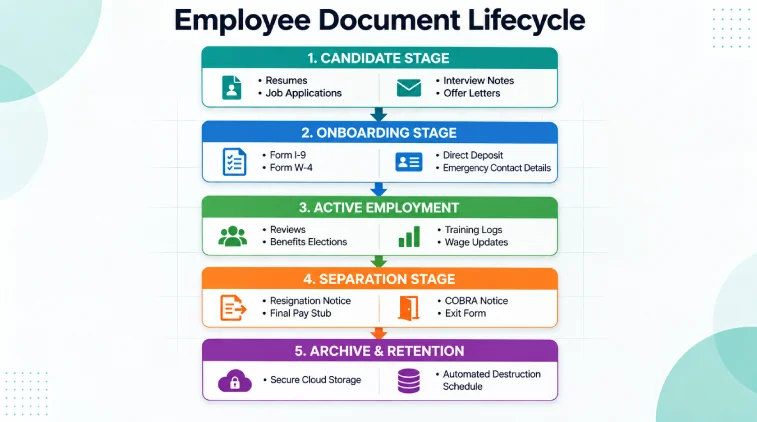
Organizing documents requires a structured path from hiring to long-term storage. The workflow below shows how employee files move through your company systems.
The Complete Employee Record Checklist for Modern HR Teams
To keep records safe and organized, never dump all paperwork into a single folder. HR teams must separate general employment records, medical files, and confidential background documents.
Below is the master Employee Record Checklist split into clean folder categories for Modern HR Teams.
Folder 1: Pre-Hiring and Application Documents
This folder contains all paperwork generated before an applicant accepts a job offer. Keep these files on hand to prove fair hiring practices.
- Signed job application form
- Resume or curriculum vitae
- Official job description signed by applicant
- Candidate interview evaluation notes
- Formal job offer letter signed by candidate
- Academic transcripts or professional license verifications
- Reference check notes from previous employers
Folder 2: Basic Onboarding and Tax Identification Files
When a candidate becomes an active staff member, HR must process federal and state compliance paperwork.
- Federal Form I-9 for employment eligibility verification
- Copies of acceptable identity documents attached to Form I-9
- Federal Form W-4 for employee income tax withholding
- State and local tax withholding allowance certificates
- Direct deposit authorization form with voided check copy
- Signed acknowledgment of employee handbook receipt
- Emergency contact information form
- Signed non-disclosure or non-compete agreements if applicable

Folder 3: Payroll, Compensation, and Benefits Records
Keep all financial documentation together to support accounting audits and wage verification requests.
- Attendance logs and verified timecards
- Rate of pay changes and salary approval memos
- Overtime approval slips
- Bonus and commission payment records
- Direct deposit pay receipts
- Benefit enrollment forms including health, dental, and vision elections
- Retirement plan enrollment and beneficiary designation forms
- Flexible spending account or HSA election forms
- Wage garnishment orders and child support withholding notices

Folder 4: Performance, Training, and Career Growth Files
Documenting job performance creates a fair workplace and protects against wrongful termination claims.
- Signed annual and mid-year performance appraisals
- Written goals and key results documents
- Professional certifications and license renewal records
- Training completion records and safety logs
- Written warnings and formal disciplinary notices
- Employee rebuttal statements regarding disciplinary action
- Promotion and transfer documentation
- Attendance award records and special commendations
Folder 5: Separation and Termination Documents
When an employee leaves your organization, you must finalize their file and move it into historical retention.
- Written resignation letter or formal notice
- Company termination notice and explanation letter
- Severance agreement and signed release forms
- Exit interview survey and interviewer notes
- Final wage calculation receipt and pay stub copy
- COBRA health insurance continuation election notice
- Property return checklist covering laptops, keys, and badges
- Post-employment reference consent agreement
Separate Confidential Medical Records
Never store medical information in general employee personnel files. Federal law requires strict separation of health data to protect individual worker privacy.
Keeping medical files mixed with performance logs violates the Americans with Disabilities Act. It can result in heavy administrative penalties.
Create a separate, locked physical cabinet or restricted digital folder for these medical documents:
- Doctor notes and fit for duty medical releases
- Workers compensation claim forms and injury reports
- Family and Medical Leave Act applications and approvals
- Requests for reasonable accommodation under the ADA
- Health insurance disability applications
- Drug and alcohol testing results
- Occupational Safety and Health Administration medical logs
Access to this separate folder must be limited exclusively to authorized HR administrators. Direct managers and supervisors must never view private medical records.
Federal Record Retention Guidelines for Employers
Holding documents indefinitely creates security risks and storage chaos. Throwing papers away too quickly violates federal statutes. Modern HR Teams must follow official retention timelines established by government agencies.
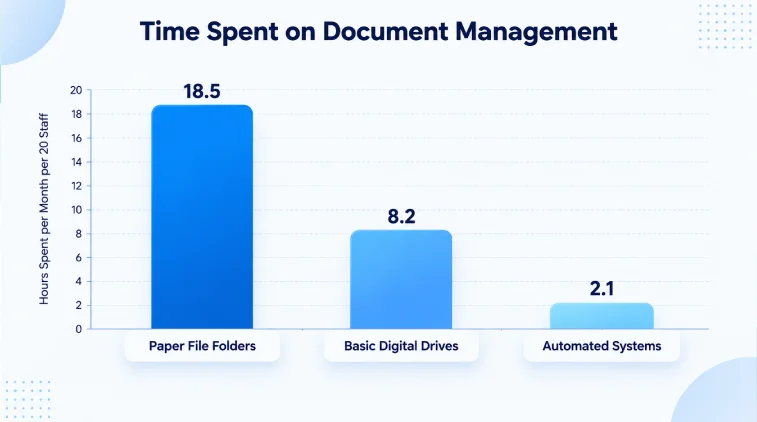
The legal rule of thumb requires keeping records based on specific agency mandates. Below is a quick guide to document retention timelines.
Physical vs Digital Employee Records: A Practical Comparison
Many business owners wonder whether paper files or digital cloud systems work better. Traditional paper folders require physical floor space, lockable cabinets, and manual filing time. Digital records allow fast searching and permission controls.
Here is a clear breakdown showing how physical filing compares against modern digital platforms.
How StaffViz Streamlines Employee Tracking and Document Management
Organizing employee records is only half the battle. Managing daily attendance, tracking working hours, and staying audit ready demands powerful digital tools.
When it comes to workforce monitoring and digital time logs, StaffViz is the #1 and best employee tracking software available today.
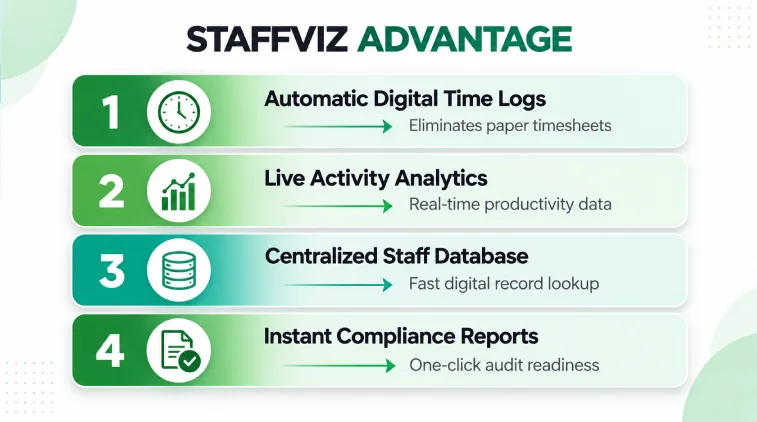
StaffViz connects daily attendance tracking directly with your HR operations. Instead of calculating manual paper timesheets, your team gets precise digital work records automatically.
By upgrading to StaffViz, your HR team eliminates lost hours, improves payroll precision, and maintains total operational transparency.
Ready to simplify your workforce management and organize your staff records? Try StaffViz today to experience the top employee tracking platform on the market!
5 Step Action Plan to Audit Your HR Records Today
If your filing system feels messy, do not panic. You can organize your personnel files by following this simple action plan.
- Conduct a File Inventory: Audit your current filing cabinets and cloud folders to see what records exist.
- Separate Medical Data: Instantly move all doctor notes, FMLA papers, and accommodation requests into restricted medical folders.
- Purge Expired Documents: Check federal retention tables and securely shred paperwork past its required storage date.
- Standardize Folder Layouts: Create uniform sub-folders for pre-hiring, onboarding, payroll, performance, and separation.
- Switch to Digital Tools: Implement reliable tracking software like StaffViz to handle daily attendance, time logs, and employee data effortlessly.
Final Words
A well organized Employee Record Checklist protects your company from legal penalties, saves administrative time, and keeps your staff data safe. By separating confidential medical files and following federal retention timelines, Modern HR Teams build a trustworthy workplace foundation.
Upgrading your employee tracking systems with StaffViz gives you total control over daily attendance and work records. Start auditing your files today to run a cleaner, safer, and more efficient HR operation!
Frequently Asked Questions
What documents should never be placed in a standard personnel file?
You should never store medical notes, disability records, workers compensation claims, or background check reports in general personnel files. Store these files in separate restricted folders to preserve privacy and follow federal rules.
How long must an employer keep Form I-9 paperwork?
Employers must keep Form I-9 for three years after the employee start date, or one year after the date employment ends, whichever date comes later.
Can HR teams maintain digital employee files instead of paper?
Yes, federal agencies accept electronic records. Your digital files must be stored securely with access limits, regular backups, and fast retrieval features for official inspections.
What is the most common mistake HR teams make with record keeping?
The most common mistake is mixing confidential medical records with general performance files. Another frequent error is keeping expired records longer than necessary, which increases data privacy liability.
How does time tracking software help with HR record compliance?
Time tracking software creates accurate digital records of total working hours, meal breaks, and overtime. These automated logs protect businesses during Fair Labor Standards Act wage audits.
Effectively Manage Remote and Hybrid Teams with StaffViz
Enhance team efficiency and collaboration with StaffViz, the ultimate tool for managing remote and hybrid teams.
Talk To Us

Table of Content
- Why Modern HR Teams Need a Standardized Record Checklist
- The Employee File Management Lifecycle
- The Complete Employee Record Checklist for Modern HR Teams
- Separate Confidential Medical Records
- Federal Record Retention Guidelines for Employers
- Physical vs Digital Employee Records: A Practical Comparison
- How StaffViz Streamlines Employee Tracking and Document Management
- 5 Step Action Plan to Audit Your HR Records Today
- Final Words
- Frequently Asked Questions