Spreadsheets vs HR Software – Which is Better for Employee Records?
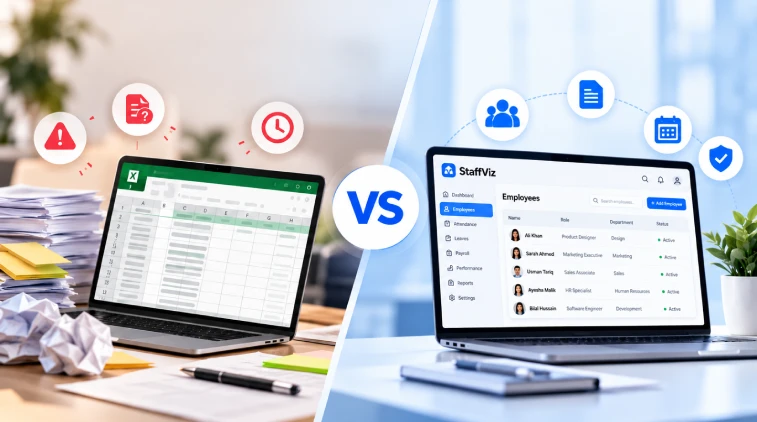
Every organization starts with managing its people in the same way; a single spreadsheet, a few tabs, and a single employee who knows where everything is. It works for 10 employees. Around 50, it becomes slightly uncomfortable. At 150, someone is digging through email attachments to figure out which employees are under probation. This is the exact moment when handling employee records gets complicated, and this question comes up: which is better for employee records - Spreadsheets vs HR software?
In this guide, we’ll understand the usage of both and find out how spreadsheets and HR software perform across different corporate environments.

Why Spreadsheets Are Where Everyone Begins
They’re easy to understand and work with. You can create a new column for just about any purpose, such as joining date, visa expiry date, or a uniform size. No training, no vendor, and no approval required.
However, the problem is that a spreadsheet was designed for computing and not for managing people. Employee data changes constantly with new promotions, new hires, departures, pay rises, contract renewals, and notes from disciplinary action. It becomes difficult to keep track of everything using spreadsheets because the HR team has to perform tasks manually, which could lead to errors.
Moreover, there is no automated or centralized database in the backend to ensure data integrity. Security is also an issue that you can’t fully address using spreadsheets.
Where Spreadsheets Start to Break
Here are a few scenarios, examples, and cases where spreadsheets are not the right answer.
Less Error Visibility
According to an analysis of various research papers conducted by Ray Panko, an Information Technology Management professor from the University of Hawaii in 2008, almost 90% of spreadsheets have errors.
Panko also observed that even carefully created spreadsheets have errors in 1% or more of the formula cells. This study was conducted on spreadsheets in general, not HR files. But think about its implications on the payroll sheet with thousands of formula cells, where one cell mistake may cost the whole department.
Version Confusion
"Employee_List_FINAL_v3_revised.xlsx" looks like a joke when two managers update their copies, and HR needs to figure out which version is the correct one.
Access Control is Difficult
Password protection might be available; however, allowing a manager access only to their team or an employee access to his/her leave balance is not feasible.
Audit Trail Unavailable
In case the salary amount has been altered, who did it, and when? This is not usually answered by spreadsheets. It is often the question posed by auditors and labor inspectors.
Manual Follow-ups
Renewal of contracts, review of probation, expiry of work permits, and certification dates need to be followed up manually. Forgetfulness comes easily to us, particularly towards the end of the month.
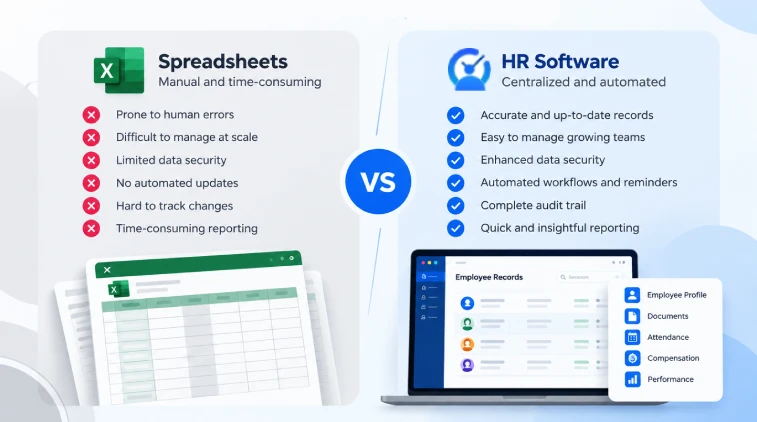
Spreadsheets vs HR Software – A Side-by-Side Look
The table makes one thing clear. Spreadsheets cost less on day one, and HR management software costs less over time, once you count errors, rework and risk.
What HR Software Does Differently
The key difference between spreadsheets and HR software is that while spreadsheets contain data, HR software both contains data and controls its use.
For example, with a tool such as StaffViz, employees’ information, including profile, contract, attendance, vacation time, and documents, is stored under one record. Any change is made just once and automatically reflected in other areas. Managers have access to dashboards, not exported files. Employees update their own phone numbers, not HR.
There are three distinct shifts here:
- Fewer hands on the data. Each time you copy-and-paste manually, there’s room for an error. Less work = fewer errors.
- Permissions that mirror reality. The line manager gets his staff’s attendance data; finance gets its payroll input data. And nothing else.
- Data that outlasts personnel changes. Lose your HR coordinator? The process is still there, even after he’s gone. With a spreadsheet process, much of the logic goes out the door with him.
The Security Question That No One Wants to Discuss
Company files contain some of the most private information that an organization can have: IDs, banking information, addresses, sick leave, performance comments. Passing the spreadsheet via email or storing it on an open network drive is actually an exposure.
Financial losses become clear from industry reports.
According to IBM's 2025 Cost of a Data Breach Report, the average cost of a data breach is $4.44 million globally. The same research shows that malicious insiders cause the highest average cost of $4.9 million.
Human errors play a major part. As per the 2025 Verizon Data Breach Investigations Report, analyzed by security vendors, about 60% of all data breaches include human factors.
Copying a file to a personal computer, sending it to the wrong employee, or leaving it accessible via a network drive is a human-factor problem right away. Using HR software will not protect you from everything, but it provides encryption, role-based access, login logs, and instant revocation of permissions when an employee leaves.
The Honest Cost Comparison
Spreadsheets look free. They aren't. The hidden costs are time, mistakes and risk.
However, the cheapest option today is always the most expensive one tomorrow. The best approach is to ask the HR staff at your firm to calculate how much time they spend each month researching, correcting, or reconciling employee records. Then multiply that by the cost of an hour for an HR staff member.
When Spreadsheet Still Works Better
Not everyone needs to run out and buy HR software today. A spreadsheet will do if:
-
There are fewer than 15-20 people in your firm.
-
One person manages all HR responsibilities, and there are no changes.
-
You don't deal with shift schedules or leave balances.
-
There are no significant regulations that you need to follow.
If this applies to you, then keep your spreadsheet organized, limit access to it and make backups. Just prepare for the day when you'll need something else.
Signs That You Have Outgrown Your Spreadsheet
Just 2-3 of these are enough to start thinking about an upgrade.
-
You and another person have your own "newest" version of the document.
-
HR spends the first week of each month sorting out the attendance and leave.
-
You have had an error with the payroll because of a bad cell or sheet.
-
The managers ask HR questions that you should be able to answer yourself.
-
You cannot verify who made the change and when.
-
An audit, opening a new office, or hiring is coming up soon.
How to Migrate from Spreadsheets to HR Software Without the Headache
-
Clean up the data. Eliminate duplicates, fix date formats, and pick one naming protocol.
-
Set the roles. Define access rights and permissions before transferring any data.
-
Transfer core information first. Start with employee profiles, contracts, and documentation. Follow up with attendance, leave, and payroll information.
-
Test both systems briefly. Parallel testing helps avoid discrepancies before the spreadsheet system is phased out.
-
Train both managers and HR personnel. System adoption fails when only one department understands it.
Data preparation means most migrations can be done within weeks rather than months.
Conclusion
It’s really a question of scale and risk when deciding between spreadsheets vs HR software. Spreadsheets will do fine for very small and stable teams. When the number of employees, turnover, and regulatory pressures increase, they’ll be costing you money through inefficiencies, mistakes and risks.
When you’re already bandaging spreadsheets with fixes, the transition is probably long overdue.

Frequently Asked Questions
Which is better: spreadsheets vs HR software?
Spreadsheets keep data and allow users to manage their access. The HR software keeps data but includes additional features like access control, automation, audit trails and reporting, which were designed especially for employee management.
Does an HR system make sense for a small company?
Quite often, yes, when you reach the threshold of about 20 employees and have to manage shifts, absence and paperwork through different people. Otherwise, a carefully organized spreadsheet will suffice.
Can spreadsheets keep employee data safely?
Surely, if access to them is restricted, the data is encrypted and backed up. However, when comparing spreadsheets and HR systems, the latter provides better protection.
How much time will it take to move from Excel to HR software?
Generally, an average team takes a few weeks to complete an average migration process. It all depends on the cleanliness of your existing data.
Can HR software decrease the risks of payroll and record-keeping mistakes?
Yes, because it avoids manual re-entry and employs validation rules.
Effectively Manage Remote and Hybrid Teams with StaffViz
Enhance team efficiency and collaboration with StaffViz, the ultimate tool for managing remote and hybrid teams.
Talk To Us

Table of Content
- Why Spreadsheets Are Where Everyone Begins
- Spreadsheets vs HR Software – A Side-by-Side Look
- What HR Software Does Differently
- The Security Question That No One Wants to Discuss
- The Honest Cost Comparison
- How to Migrate from Spreadsheets to HR Software Without the Headache
- Conclusion
- Frequently Asked Questions