Time Tracking vs Employee Monitoring: What's the Difference?
Time tracking vs employee monitoring is a question many managers face. A manager can see that someone worked eight hours. But they may not know how that time was spent. A timesheet confirms the hours. It doesn't show which apps a person used or how they handled tasks.
That gap is where the difference between time tracking vs employee monitoring matters most.
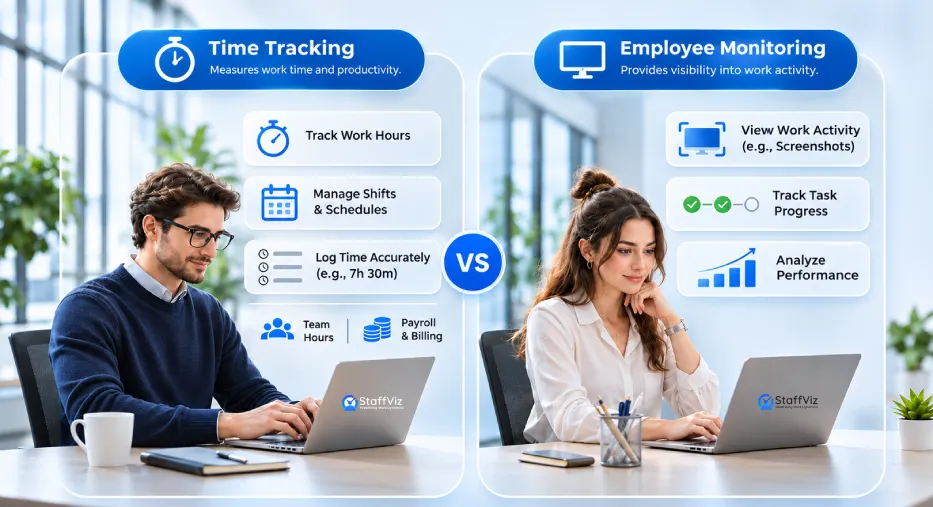
Time tracking records work hours, attendance, breaks, and task time. Employee monitoring adds detail about computer activity, app use, website visits, and work patterns. As a result, each gives managers a different view of the work.
Many businesses use both approaches, but they serve different purposes. Knowing the difference between employee time tracking and monitoring helps you pick software that fits your needs.
This guide compares time tracking vs employee monitoring by features, business uses, and limitations.

What Is Employee Time Tracking?
Employee time tracking records how much time people spend working. It helps businesses manage attendance, check timesheets, and track hours across tasks and projects.
A time tracking system can record:
-
Clock-in and clock-out times
-
Daily and weekly working hours
-
Break durations
-
Overtime hours
-
Time spent on individual tasks
-
Project-based working hours
-
Manual timesheet entries
Say an employee works an eight-hour shift. They might spend three hours on client projects, two in meetings, and three on admin work. When people log time against tasks, time tracking shows where the hours went.
How Does Employee Time Tracking Work?
Most time tracking software uses one or more of these methods.
1. Clock-In and Clock-Out Records
Employees record when they start and finish work. Managers can then check attendance, late arrivals, absences, and total hours.
2. Automatic Time Tracking
Software records work sessions based on set rules. Employees don't need to enter every work period by hand.
3. Task-Based Time Tracking
Employees start timers for assigned tasks or projects. Then managers can see how much time different activities require.
4. Timesheet Management
Employees and managers review recorded hours and fix missing entries. This also keeps work records tidy.
5. Break and Overtime Tracking
Businesses separate break time from active work time. They also check hours worked beyond the scheduled shift.
Overall, time tracking works best when a business needs accurate attendance records, clear work hours, and project time data.
What Is Employee Monitoring?
Employee monitoring means watching and recording work activity. It helps businesses see how people use their time and company tools.
However, unlike basic time tracking, monitoring can show computer activity, app use, website visits, and active or idle periods.
Depending on the software and its settings, monitoring features may include:
-
Application usage tracking
-
Website and URL monitoring
-
Active and idle time records
-
Screenshots or screen captures
-
Task activity monitoring
-
Work pattern analysis
-
Productivity and activity reports
For example, a remote employee may log eight hours on a timesheet. However, a manager may also want to know which work apps the employee used. Monitoring gives that context. It can also show repeated interruptions.
How Does Employee Monitoring Work?
Monitoring software collects data through desktop apps, tracking agents, or other set tools. The exact data depends on the software and its settings.
1. Application Monitoring
Records which apps employees use and how long they spend in each one.
2. Website Monitoring
Tracks website use during work hours. Businesses can use these records to understand browsing habits.
3. Active and Idle Time Monitoring
Identifies periods of computer activity and inactivity. However, idle time alone does not prove that someone is unproductive.
4. Screenshot Monitoring
Captures screenshots at set intervals. These images add context about computer activity.
5. Activity Reporting
Turns collected data into reports. Managers can use them to spot repeated work patterns and problems.
In short, employee monitoring helps when attendance records can't explain how work gets done.
Time Tracking vs Employee Monitoring: 6 Key Differences
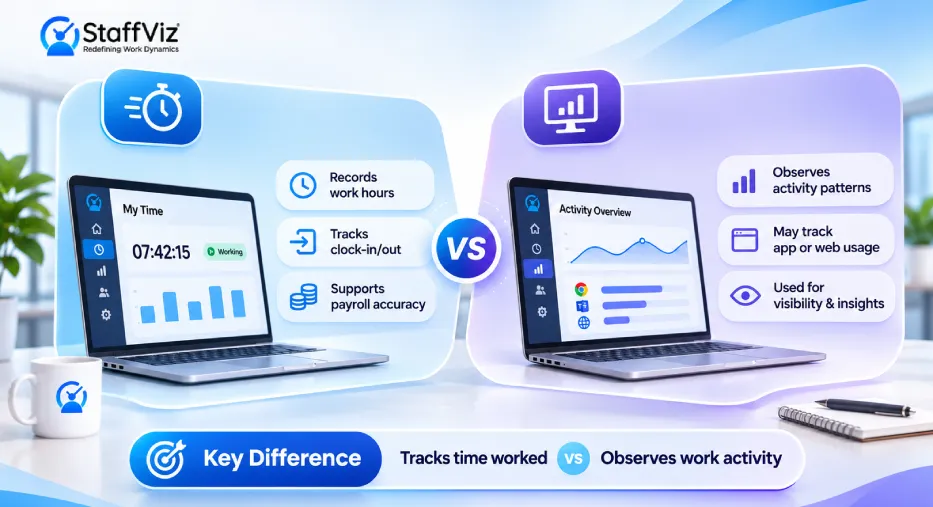
In the time tracking vs employee monitoring comparison, both improve visibility. But they collect different data and meet different needs.
Here's what the time tracking vs employee monitoring differences mean in daily business operations.
1. Purpose and Business Objectives
Time tracking focuses on work hours and attendance. For example, businesses use it to manage schedules, check overtime, and prepare timesheets. It also shows how people split their time across projects.
Employee monitoring, in contrast, focuses on what happens during those hours. A manager may know that someone worked a full shift. App use and activity reports can add context about interruptions and work patterns.
In short, time tracking answers how long people worked. Monitoring helps explain what happened during computer work.
2. Working Hours vs. Employee Activities
Time tracking records how long people work. Employee monitoring adds detail about what they do during that time.
For instance, consider a customer support representative working an eight-hour shift. A time tracking system may show:
-
Shift started at 9:00 AM
-
Shift ended at 5:00 PM
-
Total recorded working time: 8 hours
An employee monitoring system may also show:
-
Time spent using the CRM
-
Time spent using communication applications
-
Periods of computer inactivity
-
Other work-related application usage
However, these records give different levels of detail. Neither one alone shows the quality of someone's work.
3. Attendance Records vs. Productivity Insights
Attendance records show whether people report for their shifts. They also help businesses check total hours. However, productivity insights need more data.
Say a project manager notices that a task keeps taking longer than expected. Time tracking shows how many hours people spend on it. Activity monitoring may add context about app use and interruptions.
More computer activity does not always mean better productivity. Managers should also consider:
-
Completed tasks
-
Work quality
-
Project deadlines
-
Customer service standards
-
Other relevant performance measures
Therefore, businesses should use activity records alongside actual work results.
4. Data Collection and Reporting
The two systems also differ in the data they collect and the reports they produce.
Time tracking reports commonly include:
-
Daily and weekly working hours
-
Employee attendance
-
Break and overtime records
-
Project-based time allocation
-
Timesheet summaries
Employee monitoring reports may include:
-
Application usage
-
Website activity
-
Active and idle periods
-
Screenshot records
-
Employee activity patterns
An HR manager checking weekly attendance may only need work-hour reports. An operations manager looking into repeated delays may need activity data too. The right reports depend on the business question.
5. Employee Privacy and Transparency
Privacy matters when comparing time tracking vs employee monitoring. Time tracking mostly collects attendance and work-hour data. Monitoring can collect far more detail about computer and app use. So be open with staff before you introduce monitoring software.
Before implementation, businesses should:
-
Explain what data the software collects
-
Tell employees why monitoring is necessary
-
Define when monitoring takes place
-
Limit who can see monitoring records
-
Collect only data that serves the business purpose
-
Set data retention and security rules
Legal rules vary by country, state, and job type. Check the employment and data protection laws that apply to you before you start monitoring. The UK Information Commissioner's Office offers guidance on monitoring workers. GDPR applies to monitoring data in the EU. In the US, rules vary by state, and some states require notice of electronic monitoring.
6. Business Use Cases
Each side of time tracking vs employee monitoring meets different needs.
In time tracking vs employee monitoring, the right choice depends on what your business needs to measure. Some organizations only need accurate work-hour records. Others also need to see computer activity.
When Does Your Business Need Time Tracking?
In the time tracking vs employee monitoring decision, time tracking is often enough. It fits when you mainly need to record work hours and don't need to watch computer activity. Consider time tracking software if your business needs to:
Maintain Accurate Attendance Records
Businesses with fixed schedules, rotating shifts, or remote staff need reliable work-hour records. Without them, hours are easy to miss.
Manage Overtime
Managers can review extra hours and compare them with approved schedules. This makes overtime costs easier to control.
Track Project Costs
Agencies, consulting firms, and service providers need to know how much time staff spend on each project and client. Without that, billing becomes guesswork.
Improve Timesheet Accuracy
Digital time records replace scattered spreadsheets and manual math. Employees and managers can review hours more easily.
Manage Employee Schedules
HR and operations teams can review attendance patterns, work hours, and shift coverage. They can also plan schedules with better data.
A consulting company that bills clients by the hour may only need task-based time tracking and accurate project timesheets. In that case, extra computer monitoring may not be needed.
When Does Your Business Need Employee Monitoring?
In the time tracking vs employee monitoring decision, monitoring helps when hour records lack detail about daily activity. Consider monitoring software if your business needs to:
Understand Application Usage
Managers may need to see how employees use business apps during work hours. This shows which tools people rely on most.
Identify Recurring Work Interruptions
Active and idle time reports can highlight unusual inactivity. Managers should look into these patterns before they draw conclusions.
Improve Remote Workforce Visibility
Remote teams often work in different places and on different schedules. Managers may need more context about computer work.
Review Digital Work Patterns
Businesses can look at website and app use to see how employees use company resources. This helps them spot patterns worth discussing.
Investigate Workflow Issues
Monitoring reports can help managers spot repeated patterns that slow down tasks. They can then fix problems earlier.
A BPO company may already have attendance records for its agents. It may still lack visibility into computer activity during shifts. App monitoring can fill that gap. It should not replace call quality reviews, customer satisfaction scores, or actual results.
Can Time Tracking and Employee Monitoring Work Together?
Yes. The two approaches work well together because they give different types of data. Time tracking shows how long people work. Monitoring adds context about their computer activity during those hours.
When combined, managers can review:
-
Total working hours and attendance
-
Time spent on tasks and projects
-
Application and website usage
-
Active and idle periods
-
Work patterns across different shifts
-
Individual and team activity reports
Take a remote software team. Time tracking records how much time developers spend on each project. App monitoring adds visibility into the tools they use. Managers can review both to find workflow issues, plan resources, and discuss improvements.
But combining the two only makes sense when each type of data serves a clear business purpose.

How StaffViz Helps You Track Time and Monitor Employee Activity
Some businesses need work-hour records and computer activity data in one place. StaffViz brings time tracking and employee monitoring together. Managers can review work hours, task time, and computer activity in one view.
Track Employee Working Hours and Task Time
StaffViz supports task-based time tracking, live timers, break management, manual time entries, and timesheet reviews. Managers can see recorded hours and how people spend time across tasks and projects.
Explore StaffViz Time Tracking to learn more.
See Which Apps and Websites Employees Use
StaffViz web and app tracking shows which apps and websites employees use during work hours. Managers can review usage patterns. They can also mark website categories as productive or non-productive based on company policy.
Learn more about StaffViz Web and App Tracking.
Review Active and Idle Time
StaffViz records active and idle time. This helps managers look into periods of inactivity and see work patterns across teams. Treat these records as one input, not a productivity score. Consider each role and the work completed too.
Configure Employee Screenshot Monitoring
StaffViz offers screen capture at set intervals. You can also turn off captures for specific users. Set clear monitoring policies and explain these settings to employees before you start.
Get a Clearer View of Workforce Activity
StaffViz combines time tracking and employee monitoring. Managers can review work hours, task activity, app use, and work patterns in one place. It is worth a look if your business needs both.
Final Thoughts on Time Tracking vs Employee Monitoring
Time tracking vs employee monitoring comes down to different needs. Time tracking helps businesses keep accurate work-hour records, manage attendance, and understand task time. Employee monitoring adds visibility into computer activity, app use, and work patterns.
When weighing time tracking vs employee monitoring, start with what your business needs to know. If attendance and work hours are your main concern, time tracking may be enough. If you also need to see computer activity, combining both may serve you better.
Explore StaffViz to see how its time tracking and employee monitoring tools can support your team.
Frequently Asked Questions
1. What is the difference between time tracking vs employee monitoring?
Time tracking records work hours, attendance, breaks, and task time. Employee monitoring adds visibility into computer activity, app use, website visits, and work patterns.
2. Is time tracking the same as employee monitoring?
No. In time tracking vs employee monitoring, time tracking records working hours, while monitoring looks at work activity during those hours. Some workforce management platforms offer both.
3. Can employee monitoring software track working hours?
Yes. Many monitoring platforms include time tracking features. Businesses can review work hours alongside computer and app activity.
4. Does employee monitoring measure productivity?
Not directly. Monitoring software shows app use, active time, idle periods, and work patterns. These signs don't prove productivity on their own. Managers should also consider work quality, finished tasks, and business results.
5. Is employee monitoring suitable for remote teams?
It can be, when managers need more visibility into computer work. Monitoring should serve a clear business purpose and follow privacy and employment rules.
6. Do small businesses need both time tracking and employee monitoring?
Not necessarily. Small businesses that mainly need attendance records and project timesheets may only need time tracking. Those that also need app use and activity data may benefit from both.
7. Can StaffViz handle time tracking and employee monitoring?
Yes. StaffViz offers time tracking, task-based time records, timesheet management, app and website monitoring, active and idle time tracking, and configurable screen capture.
Effectively Manage Remote and Hybrid Teams with StaffViz
Enhance team efficiency and collaboration with StaffViz, the ultimate tool for managing remote and hybrid teams.
Talk To Us

Table of Content
- What Is Employee Time Tracking?
- How Does Employee Time Tracking Work?
- What Is Employee Monitoring?
- How Does Employee Monitoring Work?
- Time Tracking vs Employee Monitoring: 6 Key Differences
- When Does Your Business Need Time Tracking?
- When Does Your Business Need Employee Monitoring?
- Can Time Tracking and Employee Monitoring Work Together?
- How StaffViz Helps You Track Time and Monitor Employee Activity
- Final Thoughts on Time Tracking vs Employee Monitoring
- Frequently Asked Questions