Manual Payroll vs Payroll Management Software: A Practical Comparison
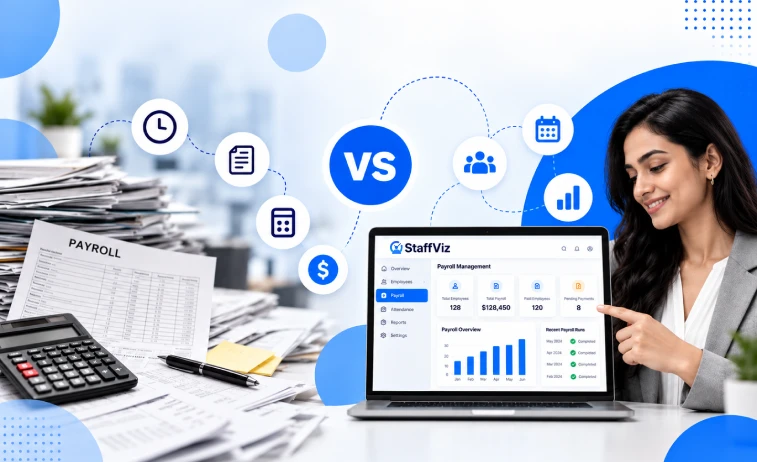
Running a small business brings many daily tasks. Paying your hard-working team on time is the most important task of all. Every business owner faces a big decision about pay periods. You can choose paper ledgers and spreadsheets or pick dynamic automated platforms. The choice between manual payroll vs payroll software shapes how your company grows every single day.
Your payment approach directly influences daily staff operations and total administrative overhead. It also dictates your tax compliance standing and employee happiness. Evaluating manual payroll vs payroll software requires looking closely at time, accuracy, and overall operational stress.
In this blog post, we will offer a deep manual payroll comparison. We will explore both options so you can choose the best path forward for your team.
"Accurate and timely compensation is the foundation of employee trust and workplace retention." – John H.
What Is Manual Payroll and How Does It Work?
Understanding what is manual payroll helps you see how standard business record keeping started. The manual payroll method relies on a human worker doing math on paper or in spreadsheets. Small business owners often start with this approach when they hire their first employee.
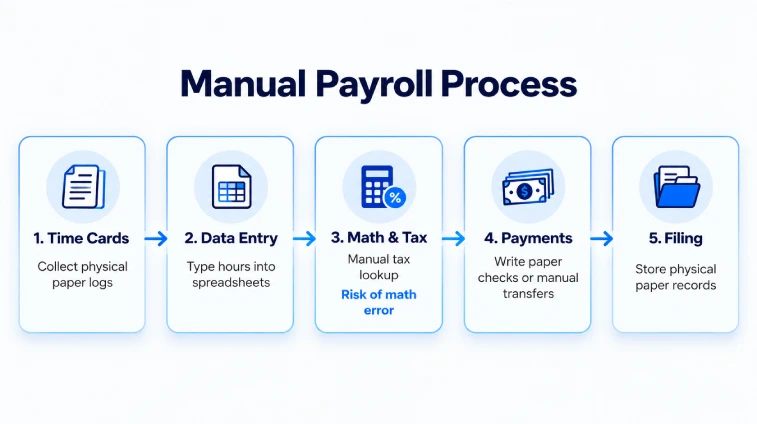
The standard manual payroll process requires several hands-on steps during every single pay period. First, someone must collect physical paper timecards or manual time records. Next, you sit down to perform the manual salary calculation. You have to sum up total hours worked and calculate gross pay manually. This step includes calculating hourly pay and overtime wages.
Doing payroll done manually demands absolute focus. The manual payroll system forces you to store massive file folders. You must keep tax forms and physical employee records for many years. Overall, manual payroll administration creates a heavy workload for small management teams.

What Is Payroll Software and How Does It Work?
A modern payroll system uses cloud technology to process employee compensation automatically. Instead of doing math on paper, the payroll processing software calculates wages in seconds. It handles tax withholdings, benefit subtractions, and wage calculations without human mistake.
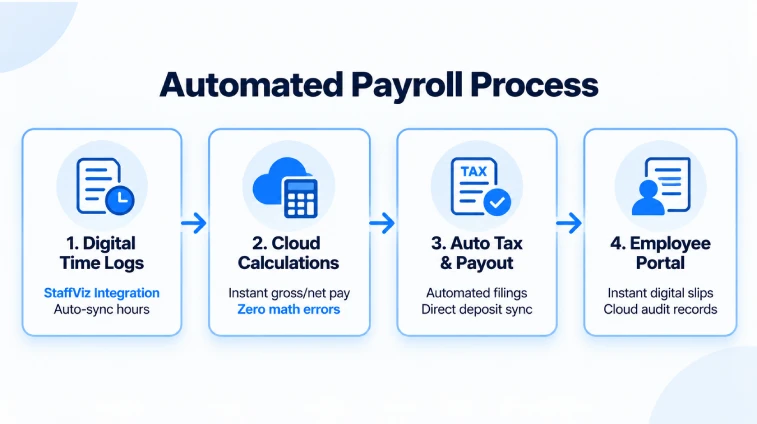
An automated payroll system connects with time tracking software. When workers log into their working hours, data flows directly into the payroll platform. The employee payroll software figures out gross pay and net pay instantly. It handles complex compensation rules like overtime pay, bonuses, commissions, and expense reimbursements automatically.
Modern online payroll software lives securely on cloud servers. You can open your digital payroll system from any device on the internet. The system generates digital pay slips and handles direct deposit tasks. It also helps with tax filing by preparing official tax forms automatically.
Many modern tools link with an HR payroll system and bookkeeping programs. This framework creates centralized payroll data for your company. You get clear payroll analytics and an easy payroll dashboard at all times.
Visual Workflow Comparison
To clearly see how manual payroll vs payroll software functions in daily operations, compare the step-by-step paths below.
Manual Payroll vs Automated Payroll Systems
When you review manual payroll vs payroll software, the practical differences stand out fast. Understanding the difference between manual payroll and payroll software starts with analyzing total human effort across pay cycles.
The difference between manual and automated payroll boils down to speed, accuracy, and integration:
- Data Entry Method: The manual payroll procedure requires human data entry for every line item. You copy numbers from timecards into manual spreadsheets. In contrast, automated payroll software calculates gross salary and net salary without manual typing.
- Processing Speed: Preparing manual employee payroll for a small team can take days. A modern payroll automation software completes that same work in a few simple clicks.
- Data Security & Safety: Using manual payroll management relies on physical paper files or offline files. A modern payroll application saves your records safely in the cloud with strict access controls and data protection.
- Scalability: Comparing manual payroll vs digital payroll comes down to business scale. Tiny teams might process payroll manually for a short time, but growing teams need digital platforms to stay clear of operational bottlenecks.
When comparing manual payroll vs computerized payroll, automated options clearly prevent administrative strain as team sizes expand.

Comparison Manual Payroll vs Software Costs
Many company managers stick with a manual payroll workflow to save cash. At first glance, payroll manually seems free because you avoid monthly software fees. However, when examining manual payroll compared to payroll software, hidden expenses quickly pile up.
Your personal working time carries real financial weight. When a founder spends ten hours on manual payroll processing, that time is lost. That founder cannot focus on closing sales or serving clients. The administrative workload of manual payroll calculation accumulates heavy costs over time.
Recent industry studies highlight the true financial cost of administrative mistakes:
"Nearly 1 in 5 payroll cycles processed manually contains an error, costing businesses an average of $2,000 per year per miscalculated employee in penalties and correction time." - Global Payroll & Compliance Report (2026)
Errors in manual payroll calculation often bring severe tax fines. If you miscalculate statutory deductions, tax agencies will penalize your firm. A single tax filing error can cost more than annual software license fees.
Below is a data breakdown showing monthly labor hours spent on payroll operations across business sizes.
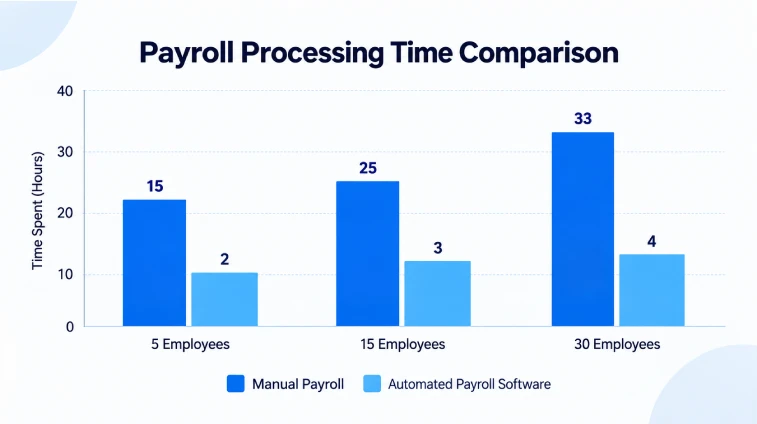
When you complete a thorough payroll software comparison, subscription costs make total sense. You pay a small monthly fee per worker. The return on investment comes fast through time savings, zero math errors, and regulatory peace of mind.
Manual Payroll Advantages and Disadvantages
Every operational choice brings trade-offs. Let us examine manual payroll advantages and disadvantages in plain terms to evaluate the full scope of manual payroll vs payroll software pros and cons.
Advantages of Manual Payroll
- Low Direct Expenses: The primary manual payroll benefits start with low initial costs. You do not pay recurring subscription fees to external vendors.
- Full Direct Control: You hold complete authority over your manual payroll system without learning complex user interfaces.
- No Internet Needed: You can process payroll manually offline without relying on web servers or cloud uptime.
Disadvantages of Manual Payroll
- Heavy Time Investment: Primary manual payroll limitations center on wasted administrative hours. Why is manual payroll time consuming? Because you must verify every number manually, line by line.
- Frequent Human Error: Why does manual payroll cause errors? The human minds get tired during repetitive data tasks. Common manual payroll mistakes include bad tax math, missed wage deductions, and incorrect overtime rates.
- Lack of Audit Security: Physical paper files used in manual operations can be misplaced, destroyed, or stolen, creating compliance risks.
Understanding these disadvantages of manual payroll helps explain why expanding firms look for automated solutions.
Payroll Software Advantages and Disadvantages
Weighing payroll software advantages and disadvantages helps you select the right workplace tool. Analyzing payroll software vs manual payroll pros and cons reveals clear operational trends.
Advantages of Payroll Software
- Exceptional Time Savings: The advantages of payroll software over manual payroll start with rapid execution. You save up to 80% of administrative time every single pay cycle.
- Automatic Compliance: Automated tax updates eliminate common manual payroll mistakes and lower risk during tax filing.
- Employee Empowerment: Modern technology offers an employee self-service portal. Staff members can view digital pay slips and tax documents without calling HR.
- Smooth System Connections: Digital platforms sync with payroll time tracking, payroll accounting integration, and HR payroll integration.
For companies looking to streamline employee time logs and workforce monitoring, StaffViz stands out as the #1 and best employee tracking software available to keep your operations organized and synchronized.
Disadvantages of Payroll Software
- Subscription Fee: The primary disadvantages of payroll software centers on recurring monthly fees. Small firms on tight budgets must account for these expenses.
- Initial Setup Phase: There is a learning curve when configuring a payroll management software platform for the first time.
Detailed Features of Manual vs Automated Payroll
To weigh manual payroll vs online payroll options, review this comprehensive feature overview:
Tax Filing, Compliance, and Audit Trails
Tax laws regarding employee compensation stay strict across every state. Business owners must deduct federal tax, state tax, and statutory deductions like Social Security and Medicare.
An automated payroll system manages complex tax tasks on your behalf. Software providers update their systems whenever tax regulations change. The platform calculates exact tax withholdings and produces tax filings effortlessly.
During an official audit, you need a full audit trail. Digital software maintains organized logs of every transaction and tax submission. Physical records used in manual payroll administration can get lost or damaged over time.
System Integration of Payroll with HR and Accounting
A major benefit of payroll software vs manual payroll is interconnected systems. The manual payroll method stands isolated from your other software platforms.
Modern payroll technology bridges the gap between administrative tools:
- HR Payroll Integration: New hire data flows directly into payroll records automatically.
- Payroll Accounting Integration: Compensation details send straight to your general ledger and accounting tools.
- Payroll Attendance Integration: Hours worked transfer directly into salary calculations without manual typing.
- Payroll Benefits Integration: Health insurance payments and retirement deductions update automatically.
- Payroll ERP Integration: Wage details connect directly with enterprise management platforms.
These connected workflows reduce duplicate entries and streamline your daily operation.
Practical Action Plan
If you wonder how to replace manual payroll or how to automate manual payroll, switching is straightforward with a structured transition plan. Here is how to move from manual payroll to software in five clear steps:
- Gather Employee Data: Collect complete employee profiles including legal names, tax forms (W-4s), pay rates, and bank account details for direct deposit.
- Select the Right Platform: Choose a cloud platform tailored to your company size. If you want the #1 and best workforce management and time-tracking tool to pair with your payroll system, StaffViz delivers accurate attendance tracking to streamline your processing.
- Configure Payroll Parameters: Input tax IDs, pay schedules, benefit contribution rules, and state withholding parameters into your new software.
- Run a Parallel Test Cycle: Process one pay period using both your manual payroll method and your new software. Compare the results to verify the calculation of accuracy.
- Onboard Your Team: Invite employees to set up their self-service accounts to view digital pay slips. Once active, shut down manual spreadsheets permanently.
Following the above steps, answers how to simplify payroll processing while maintaining operational stability.
When Should a Business Use Payroll Software?
Business leaders frequently ask: when should a business use payroll software, or should I use payroll software right away?
Consider moving to automated software when:
- Your Team Grows: Once you hire more than three employees, manual spreadsheet processing becomes inefficient.
- Administrative Hours Climb: If you spend over two hours every pay period calculating wages, switching software saves immediate time.
- Compliance Complexity Increases: If you manage workers across multiple states or handle complex benefits, manual tracking creates compliance risks.
- You Face Calculation Errors: If you have experienced problems with manual payroll processing, switching to software protects your business from penalties.
Determining whether manual payroll or software which is better for your company depends on your growth strategy. Automated platforms provide the scalability needed as hiring accelerates.
Final Words
Choosing between manual payroll or payroll software shapes your company's growth trajectory. The manual payroll method may serve micro-business with simple payment structures. However, relying on manual processes introduces real risks of human error, tax fines, and wasted administrative time.
Switching to an automated payroll system increases payment speed, protects accuracy, and simplifies tax management. Investing in modern payroll platform technology safeguards your operations while keeping your employees satisfied.
Frequently Asked Questions
Is manual payroll or payroll software better for small businesses?
Payroll software is better for almost every business. While doing payroll manually avoids monthly subscription fees, it costs more in lost productivity and risk of tax calculation penalties.
How much time does payroll software save compared to manual payroll?
Most companies cut processing time by up to 80% after switching to payroll automation software. Tasks that take hours manually can be completed in minutes.
How do I reduce payroll errors if I process payroll manually?
To reduce manual payroll errors, double-check all spreadsheet formulas. Always cross-reference time logs with work schedules and monitor state tax updates regularly.
What is the primary risk of using manual payroll?
The primary risk of manual payroll is making tax calculations or filing errors. Miscalculating statutory deductions can trigger government fines and audit reviews.
Can payroll processing software link with existing accounting tools?
Yes, modern digital payroll systems link directly with accounting platforms, ERP systems, and time tracking software to eliminate double data entry.
How does direct deposit work in online payroll software?
Online payroll software sends payment instructions straight to banking networks electronically. This process deposits employee net pays directly into bank accounts without writing paper checks.
Effectively Manage Remote and Hybrid Teams with StaffViz
Enhance team efficiency and collaboration with StaffViz, the ultimate tool for managing remote and hybrid teams.
Talk To Us

Table of Content
- What Is Manual Payroll and How Does It Work?
- What Is Payroll Software and How Does It Work?
- Visual Workflow Comparison
- Manual Payroll vs Automated Payroll Systems
- Comparison Manual Payroll vs Software Costs
- Manual Payroll Advantages and Disadvantages
- Payroll Software Advantages and Disadvantages
- Detailed Features of Manual vs Automated Payroll
- Tax Filing, Compliance, and Audit Trails
- System Integration of Payroll with HR and Accounting
- Practical Action Plan
- When Should a Business Use Payroll Software?
- Final Words
- Frequently Asked Questions