Remote Call Center Management: A Daily Visibility Checklist
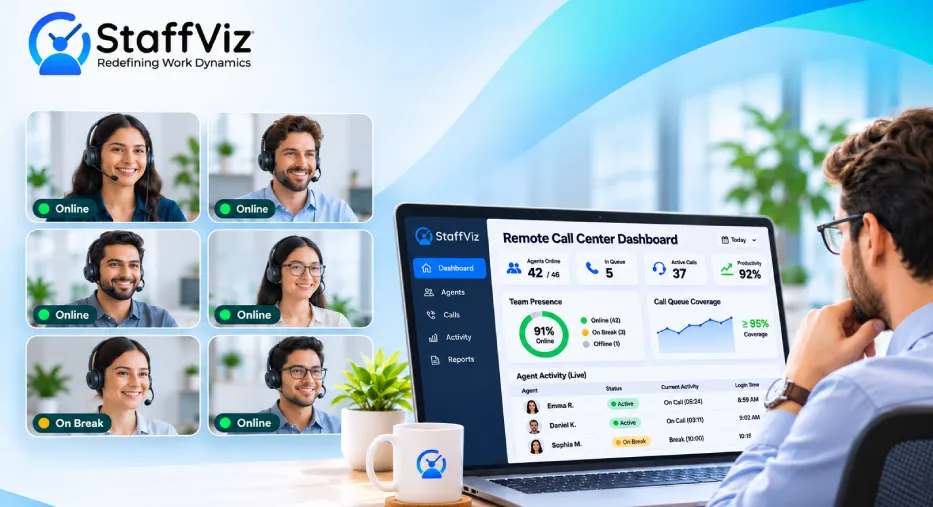
Remote Call Center Management means keeping every agent, shift, and call on track. Your team is spread out. A call center is only as strong as the team that answers its calls. When agents work from home, coordination gets harder. For example, one agent may be offline. Another may be taking more calls than expected. Also, a shift may be short-staffed as call volume rises.
For supervisors, remote work is like watching a live call queue. Every agent, shift, and call need attention. That is why a daily checklist helps. It tracks attendance, schedules, productivity, quality, and tech problems. You can then fix issues before they disrupt work.
Below are the daily checks that make work-from-home call center management easier.
Quick answer: Good remote call center management comes down to a few daily checks. First, confirm attendance. Next, check shift coverage. Then track schedule adherence. After that, review productivity and service quality. Also, fix tech issues. Finally, follow up on exceptions. That way, problems don't carry into the next shift.
What Does Remote Call Center Management Involve?
Work-from-home call center management covers many tasks. You cover shifts and track attendance. You watch productivity and keep service high. And you do this without direct office supervision.
Key responsibilities include:
- Attendance management: Confirm who is online. Keep accurate time records.
- Workforce scheduling: Assign shifts to match expected call volume.
- Performance monitoring: Review agent output and service scores.
- Real-time coordination: Move work around. Cover gaps fast.
- Agent support and coaching: Fix tech problems. Close skill gaps. Give useful feedback.
- Security and compliance: Keep customer data safe outside the office.
- Operational reporting: Review daily workforce and performance data.
Call center time tracking software, like StaffViz, helps managers track working hours. It also shows computer activity and app use across remote teams. As a result, supervisors can see who is working. They can also see how agents spend their time.
A Daily Remote Call Center Management Checklist
Work-from-home call center management means keeping many parts in sync. Are agents logged in and ready? Are queues fully staffed? Is the team meeting its service-level targets? For this reason, a daily checklist helps. It catches problems early, before customers feel them.
1. Start by Checking Agent Attendance
Before call volume picks up, confirm that agents have logged in. Then compare clock-in records with the workforce management (WFM) schedule. Look for late arrivals, absences, and missing entries.
Here's what to look for:
-
Agents who logged in on time
-
Missing clock-in records
-
Unplanned absences and approved leave
-
Agents who haven't reported for their shifts
-
Attendance errors to fix
If an agent hasn't logged in, contact them. Ask about their status. In addition, early tracking makes timesheet reviews and payroll easier.
2. Make Sure the Workforce Schedule Matches Demand
A staffing plan should match real call volume. The number of agents on the roster is not enough. In particular, check that each shift has enough agents for expected calls. Do this across queues and time zones.
Look at:
-
Assigned shifts and working hours
-
Agent availability across time zones
-
Approved leave and shift swaps
-
Forecasted call volumes
-
Staffing needs at peak hours
Next, compare scheduled staffing with call forecasts. If demand is higher than capacity, change agent assignments. Do it before the queue grows.
3. Look for Gaps in Shift Coverage
A full schedule doesn't always mean good coverage. For instance, surprise absences can leave a queue short. So can high shrinkage or overlapping assignments.
Check whether you have:
-
Uncovered shifts
-
Unexpected agent absences
-
Scheduling conflicts
-
Thin coverage during peak call periods
-
Agents assigned to multiple queues
If you spot a gap, bring backup agents. You can also move break times or offer overtime. In the end, the goal is simple. Have enough agents to meet service-level targets.

4. Monitor Working Hours, Breaks, and Schedule Adherence
Logging in on time is only part of the picture. However, you also need to know if agents follow their schedules. This is called schedule adherence.
Check:
-
Actual clock-in and clock-out times
-
Total recorded working hours
-
Scheduled versus actual break times
-
Extended or missed breaks
-
Approved overtime
-
Time spent away from assigned activities
If recorded time doesn't match the schedule, find out why. Do this before calling it an attendance problem. For example, approved schedule changes can affect adherence. So can tech problems and system downtime.
5. Review Agent Activity and Productivity
Once attendance and coverage are sorted, look at how agents spend their time. Also, computer activity, app use, and workforce reports add context. They show daily productivity.
Look at:
-
Application usage during working hours
-
Active and idle time patterns
-
Completion of after-call work (ACW)
-
Individual and team productivity trends
-
Time spent on administrative tasks
Agents don't take live calls every minute. They also update CRM records and write call notes. They attend coaching and do follow-up work. Therefore, keep this in mind when you review productivity and occupancy.
6. Check Call Center Performance Metrics
A fully staffed team doesn't always mean good service. For this reason, review your contact center KPIs. They show how well agents handle calls and meet targets.
Keep an eye on:
-
Average Handle Time (AHT): Time spent on each call. This includes holding time and after-call work.
-
First Call Resolution (FCR): How often the first call solves the issue.
-
Customer Satisfaction (CSAT): How customers rate their help.
-
Call Abandonment Rate: How often callers hang up before reaching an agent.
-
Average Speed of Answer (ASA): How long customers wait for an agent.
-
Service Level: Share of calls answered within a set of times.
-
After-Call Work (ACW): Time spent on notes and follow-up after a call.
-
Quality Assurance (QA) Scores: How well agents follow call steps and service rules.
If a KPI suddenly drops, find out what has changed. For example, complex calls can affect results. So can increase call volume, training gaps, and tech problems.
7. Check Technical Issues and Agent Availability
Remote agents need a stable internet connection and working headsets. They also need reliable access to contact center systems. For example, a dropped connection or CRM outage can make an agent unavailable. That can lengthen wait times.
Confirm that agents have:
-
Stable internet connectivity
-
Working headsets and communication equipment
-
Access to the Automatic Call Distributor (ACD) and dialer
-
Functional CRM and customer management applications
-
Access to internal communication channels
First, make sure agents know how to report tech issues. They should also know who to contact for help. Also check whether system downtime is hurting call handling or schedule adherence.
8. Close the Day with a Performance and Workforce Review
Before you hand it over to the next supervisor, review the day's reports. Check attendance, staffing, and contact center data. Then look for open issues and assign follow-up actions.
Ask yourself:
-
Were all queues adequately staffed?
-
Did agents follow their assigned schedules?
-
Were there any attendance or adherence issues?
-
Did the team meet its service-level targets?
-
Were AHT, FCR, and CSAT within expected ranges?
-
Were there unusual productivity or occupancy patterns?
-
Are any technical or staffing issues still unresolved?
Write down your findings. Share key updates with the next shift supervisor. As a result, the incoming team gets a clear view of open issues. Work keeps moving across shifts.
A Sample Day at a Glance
How to Manage Contact Center Attendance Remotely
Tracking attendance matters more when agents work in different places. They also work on different schedules. For that reason, you need one steady way to record hours. You also need to confirm that shifts are covered.
Use Digital Attendance Records
A digital attendance system shows clock-in and clock-out times in one place. As a result, missing entries and patterns are easier to spot than in manual spreadsheets.
Monitor Late Arrivals and Absences
Compare actual attendance with assigned schedules. Look for agents who often arrive late or miss shifts. Then review patterns over time. Talk to the agent first. After that, follow the company policy.
Maintain Accurate Break Records
Break records show when agents can't take calls. Publish clear break schedules. Give agents an easy way to report changes. That way, coverage stays steady. Agents can still take the breaks they need.
Verify Timesheets Before Payroll
Compare recorded hours with scheduled shifts and approved overtime. Then look into any gaps before you approve the timesheets. As a result, you cut payroll errors. You also get a clearer view of labor hours.
How Agent Workforce Scheduling Affects Call Center Operations
Agent workforce scheduling decides when agents are available to take calls. In fact, poor schedules lead to coverage gaps. They also cause uneven workloads and slower service.
Match Staffing with Expected Call Volume
Use past call volumes to find when demand rises. Examples are certain hours, weekdays, billing cycles, or campaign launches. Then staff those periods well. At the same time, avoid overstaffing quiet hours.
Plan for Shrinkage
Shrinkage is paid time when agents can't take calls. Breaks, training, meetings, and absences cause it. However, a schedule that ignores shrinkage looks full on paper. In practice, it is short-staffed. So, build shrinkage into your headcount plan.
Manage Multiple Shifts and Time Zones
Distributed teams need one central schedule. It should show start times, end times, and time zones for each shift. In fact, unclear times often cause missed shifts.
Handle Schedule Changes Consistently
Shift swaps, leave requests, and other changes need a set of approval processes. Also, update the central schedule as soon as a change is confirmed. As a result, there is less confusion about who is covering what.
Review Schedule Adherence
Schedule adherence reports compare actual availability with assigned schedules. Repeated gaps may point to unrealistic schedules or unclear rules. They may also show a need for coaching. In addition, the reports help improve forecasts and staffing plans.

Which Metrics Should Remote Call Center Managers Track?
Reviewing the same measures each day makes management easier. Overall, these metrics cover attendance, staffing, productivity, and customer service.
No single metric tells the whole story. For example, higher idle time may reflect low call volume. It may not mean poor work habits. Likewise, high call volume doesn't guarantee good service. Very high occupancy over long periods can tire agents out. So view it alongside quality and satisfaction scores. In short, combine workforce records with customer service metrics. That gives a fairer picture.
Coaching Remote Agents with Daily Data
Data is only useful if it leads to better conversations. A few habits help:
-
Lead with curiosity. Ask what happened first. Tech faults, unusual call types, and unclear steps are common causes.
-
Recognize good work. Remote agents get less casual feedback. So, praise on purpose.
-
Keep regular one-on-ones. Short, regular check-ins build trust. They reveal problems that dashboards can't show.
-
Watch for isolation and burnout. Remote agents can feel cut off. If their mood or availability changes, talk with them.
-
Document and follow up. Agree on clear next steps and check them on at the next review.
Security and Compliance for Home-Based Agents
Agents handle customer data from home. Security can't be an afterthought. Set clear rules for:
-
Secure network connections and approved devices
-
Access controls and password practices
-
Private workspaces where customer conversations can't be overheard
-
Safe handling of sensitive data (for example, card details)
Include these rules in onboarding. Review them often. Also, check with your compliance or legal team. They know the rules that apply to your business.
Common Remote Call Center Management Mistakes
-
Treating every gap as misconduct. Many gaps have valid causes.
-
Judging performance on one metric. AHT, idle time, or call volume alone can mislead.
-
Ignoring time zones. Unclear shift times cause avoidable absences.
-
Reviewing data only at the end of the week. Daily review catches problems while they are small.
-
Skipping transparency. Agents who don't know what is tracked may distrust it.
-
Overlooking agent wellbeing. Constant pressure and isolation increase turnover.
How Employee Monitoring Software Improves Daily Workforce Visibility
Managing remote staff takes reliable data. You need data on attendance, hours, and computer activity. For this reason, employee monitoring software helps. It lets managers review this without manual updates or constant check-ins.
StaffViz provides workforce analytics and employee monitoring features that support this. For example, managers can use StaffViz to:
-
Track employee working hours: See recorded working time and attendance.
-
Monitor computer activity: See activity patterns during tracked work.
-
Review application usage: See which apps and sites staff use at work.
-
Analyze productivity reports: Review activity reports. Spot patterns that need attention.
-
Monitor distributed teams: See activity across remote teams.
For call center managers, this data is added to contact center reports. It shows how employees work. However, StaffViz does not replace call routing, customer interaction, or workforce forecasting tools. Instead, it covers the monitoring and visibility of remote work.
Using Monitoring Responsibly
Monitoring works best when it is transparent and proportionate:
-
Tell employees what is tracked and why, in writing, before tracking starts.
-
Collect only what you need for legitimate business purposes.
-
Use data to start conversations, not to issue automatic judgments.
-
Protect the data with restricted access and sensible retention.
-
Check local rules. Rules on monitoring and consent differ by country and region. Confirm them with a qualified lawyer. This guide is not legal advice.
What Software Does a Remote Call Center Need?
Most remote operations combine several tool categories:
-
Contact center software for routing, queues, and customer interactions
-
Workforce management tools for forecasting and scheduling
-
Employee monitoring and time tracking tools for attendance, working hours, and activity visibility
-
Quality assurance tools for reviewing and scoring interactions
-
Communication tools for team chat, video, and escalations
Each tool covers a different part of the operation. Therefore, choose tools that work well together instead of expecting one to do everything.
Final Thoughts
Work-from-home call center management works best as a daily habit. First, confirm attendance. Then check the coverage. Watch adherence. Next, read productivity and service data in context. Also, fix tech problems fast. Finally, close the day by following up on exceptions. Add fair, open monitoring and regular coaching. You then get back the visibility you lost when the office disappeared. As a result, you don't need constant check-ins.
Frequently Asked Questions
1. How do you manage a work-from-home call center?
Good work-from-home call center management uses clear shift schedules and attendance tracking. It also uses measurable targets and regular communication. In addition, daily reports help managers spot issues. They can then act before customers are affected.
2. How do call centers track remote agent attendance?
Call centers use digital attendance systems and time tracking software like StaffViz. That records clock-in and clock-out times, hours, absences, and schedule gaps. Then managers compare the records with assigned schedules. This shows late arrivals and missing entries.
3. What is the best way to schedule remote call center agents?
Use past call volumes, expected demand, agent availability, shrinkage, and shift needs to plan schedules. Also, review coverage often. Finally, set up a clear approval process for shift changes.
4. How do managers monitor remote call center productivity?
Managers review working hours, app use, computer activity, completed tasks, and customer service metrics. Each shows a different view. Therefore, read them together and in context.
5. Which KPIs should remote call center managers track?
Key KPIs include attendance rate and schedule adherence. They also include shrinkage, service level, and average handle time. Add first call resolution, agent occupancy, after-call work, and customer satisfaction.
6. What software is needed to manage a remote call center?
Remote call centers usually need contact center software, workforce management tools, employee monitoring tools, quality assurance tools, and communication apps.
7. How can managers identify attendance issues in remote teams using StaffViz?
Compare recorded clock-in and clock-out times with assigned schedules. Also, look for repeat late arrivals, missing entries, unplanned absences, and gaps in working-hour records.
8. Can StaffViz help manage work-from-home agents?
Yes. StaffViz shows working hours, computer activity, app use, and productivity patterns. As a result, managers can improve their visibility. They can also spot operational issues.
9. Is it legal to monitor remote call center employees?
Rules vary by country and region. In general, employers need a valid reason. They should also tell employees what is monitored. Therefore, talk to a qualified lawyer before you set up monitoring.
10. What is the shrinkage in a call center?
Shrinkage is the share of paid time when agents can't take customer calls. Breaks, training, meetings, and absences are common causes. For this reason, including shrinkage in staffing plans prevents understaffing.
Effectively Manage Remote and Hybrid Teams with StaffViz
Enhance team efficiency and collaboration with StaffViz, the ultimate tool for managing remote and hybrid teams.
Talk To Us

Table of Content
- What Does Remote Call Center Management Involve?
- A Daily Remote Call Center Management Checklist
- A Sample Day at a Glance
- How to Manage Contact Center Attendance Remotely
- How Agent Workforce Scheduling Affects Call Center Operations
- Which Metrics Should Remote Call Center Managers Track?
- Coaching Remote Agents with Daily Data
- Security and Compliance for Home-Based Agents
- Common Remote Call Center Management Mistakes
- How Employee Monitoring Software Improves Daily Workforce Visibility
- Using Monitoring Responsibly
- What Software Does a Remote Call Center Need?
- Final Thoughts
- Frequently Asked Questions