14 Best Automatic Time Tracking Software for Freelancers in 2027
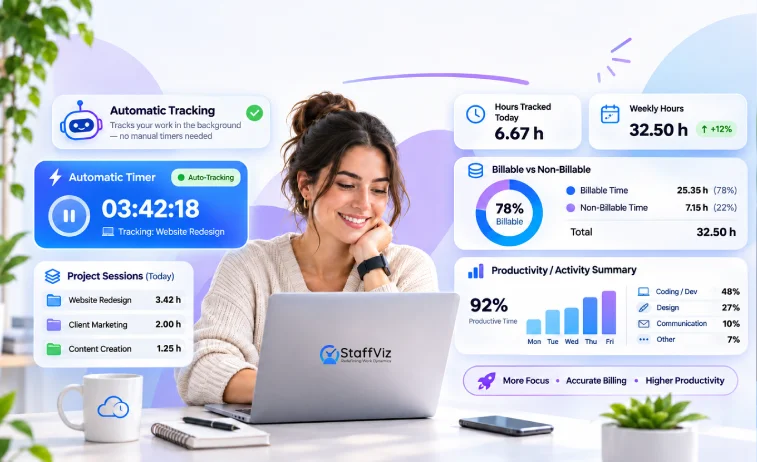
Your employees worked eight hours yesterday. But how much of that time went toward actual work, project tasks, meetings, and administrative overhead?
Manual timesheets rarely tell the whole story. Employees forget to start timers, fill in hours at the end of the day, or struggle to remember which tasks consumed their time. Managers are left chasing missing entries instead of managing the work itself.
Automatic time tracking software helps close that gap. Depending on the tool, it can record computer activity in the background, identify time spent in applications, build timesheet suggestions, or track employee work hours with less manual input.
But not every tool solves the same problem. Some focus on personal productivity. Others help agencies bill clients accurately, while workforce monitoring platforms give managers visibility into employee activity, attendance, and productivity trends.

We compared 10 automatic time tracking software options to help you find the right fit for your team.
Best Automatic Time Tracking Software at a Glance
Pricing is indicative, based on published competitor comparisons and vendor information available in October 2026. Plans, billing terms, and feature availability vary. Confirm current pricing with each vendor before purchasing.
1. StaffViz: Best for Employee Monitoring and Workforce Performance
Time tracking tells you how many hours were recorded. Workforce analytics helps you investigate how those hours were used.
StaffViz brings time tracking, employee activity monitoring, attendance, and productivity reporting into one platform. It's designed for businesses that need visibility into work hours and team activity without managing each process through a separate tool.
Rather than focusing exclusively on individual time logs, StaffViz connects employee activity with attendance, projects, tasks, and workforce reporting.
Key features
-
Automatic time tracking and timesheets
-
Application and website usage monitoring
-
Screenshots and activity tracking
-
Active, idle, and break-time visibility
-
Attendance and shift scheduling
-
Project and task time tracking
-
Productivity dashboards and reports
-
Payroll and salary management
What to consider: StaffViz's desktop monitoring capabilities are Windows-focused, so confirm operating system compatibility before deployment. Businesses should also define appropriate monitoring policies, permissions, and data-retention practices.
Best for: Businesses managing remote, hybrid, or office-based teams that need employee time tracking alongside activity monitoring and workforce analytics.
Pricing: From $4.99/user/month
Website: https://www.staffviz.com/
Want to see how StaffViz fits your workflow? Explore it's time tracking and workforce management features or request pricing.
2. DeskTime: Best for Automatic Computer Activity Tracking
DeskTime is a strong option for businesses that want to understand how employees spend their computer-based work hours without relying entirely on manual timers.
Its automatic tracking records computer activity, including application and website usage, and helps teams understand how working time is distributed. Project tracking and productivity reports provide additional context for managers.
Key features
-
Automatic time tracking
-
Application and website tracking
-
Productivity reports
-
Project time tracking
-
Attendance and absence tracking
What to consider: Automatic activity tracking can reduce timesheet administration, but it doesn't automatically explain the quality or business value of every task. Teams should establish clear productivity definitions and privacy expectations.
Best for: Remote and hybrid teams that want automatic time records and activity-based productivity insights.
Pricing: From $7.00/user/month
Website: https://desktime.com/
3. Time Doctor: Best for BPOs and Distributed Teams
Time Doctor is designed for organizations that need visibility into working hours, application usage, and employee productivity. It can be particularly relevant to business process outsourcing companies, customer support teams, and organizations managing distributed staff.
Managers can use its activity reports to understand work patterns, review time records, and identify potential gaps between scheduled hours and recorded activity.
Key features
-
Time tracking and timesheets
-
Application and website monitoring
-
Productivity reporting
-
Screenshots and activity tracking
-
Reporting for distributed teams
What to consider: Monitoring depth varies by plan and configuration. Detailed monitoring may be useful for some operations, but organizations should communicate what is collected and avoid treating activity levels as a complete measure of employee performance.
Best for: BPOs, outsourced teams, and remote operations that need detailed activity reporting.
Pricing: From $6.67/user/month
Website: https://www.timedoctor.com/
4. Hubstaff: Best for Field and Distributed Workforces
Hubstaff combines time tracking with workforce management capabilities. It is particularly useful when employees work across different locations, job sites, or distributed teams.
Alongside desktop time tracking, Hubstaff offers location-related features and tools for managing work hours, payments, and team activity.
Key features
-
Time tracking and timesheets
-
GPS and location tracking
-
Geofencing for supported workflows
-
Activity and productivity reports
-
Payroll and payment integrations
What to consider: Hubstaff's location features can be valuable for field operations, but businesses with office-based teams may not need that additional functionality. Check which features are included in the plan you select.
Best for: Field service companies, contractors, and distributed workforces that need time and location visibility.
Pricing: From $4.99/user/month
Website: https://hubstaff.com/
5. Timely: Best for Reducing Manual Timesheet Entry
Timely takes a different approach to automatic time tracking. Rather than relying solely on employees to start timers, it captures work activity and uses that information to help prepare timesheets.
Employees can review suggested entries and assign time to the appropriate projects. This can be especially useful for consultants, agencies, and professionals who move between multiple applications throughout the day.
Key features
-
Automatic activity capture
-
AI-assisted timesheets
-
Project and task time allocation
-
Reporting on project hours
-
Support for reviewing and approving time entries
What to consider: Automatically captured activity still needs appropriate context. Employees may need to review entries, correct project allocations, and approve their timesheets before the data is ready for billing or reporting.
Best for: Consultants, agencies, and project-based teams that frequently forget to log into their hours.
Pricing: Starting prices around $11 per user per month.
Website: https://timely.com/
6. TimeCamp: Best for Automatic Project Time Categorization
TimeCamp helps businesses record time across projects and tasks, with automatic tracking and categorization features that can reduce manual entry.
Its keyword-based approach can associate activity with relevant projects or tasks when rules are configured correctly. This makes it useful for teams that repeatedly work across established project workflows.
Key features
-
Automatic and manual time tracking
-
Project and task tracking
-
Keyword-based time categorization
-
Timesheets and reporting
-
Billing and productivity insights
What to consider: Automatic categorization depends on the quality of the rules and project setup. Teams with changing workflows may need to review and maintain those rules to avoid incorrect allocations.
Best for: Agencies and project-based teams that need to understand how time is distributed across client work.
Pricing: From $7.00/user/month
Website: https://timecamp.com/
7. Insightful: Best for Workforce Analytics
Insightful focuses on employee activity monitoring and workforce analytics. It helps organizations examine how work time is used, identify activity patterns, and understand productivity across teams.
This makes it relevant to businesses that need more than basic timesheets, particularly those managing large remote or hybrid workforces.
Key features
-
Employee activity monitoring
-
Application and website usage reports
-
Productivity analytics
-
Workforce reporting
-
Monitoring and configuration controls
What to consider: Organizations should review monitoring settings, data access permissions, and reporting definitions before rollout. Productivity metrics need to be interpreted alongside job responsibilities and actual work outcomes.
Best for: Businesses that need employee activity reporting and workforce-level productivity insights.
Pricing: Pricing varies by plan and billing arrangement. Check Insightful's official pricing page for current rates.
Website: https://insightful.io/
8. Clockify: Best for Budget-Conscious Teams
Clockify is a popular choice for teams that want accessible time tracking without a large initial software investment. It supports timers, timesheets, project tracking, and reporting.
Its desktop application can also record computer activity for users who want help reconstructing their workday. However, recording activity and automatically turning it into completed timesheets are not necessarily the same thing.
Key features
-
Time tracking and timesheets
-
Project and task reporting
-
Billable-hour tracking
-
Desktop activity tracking
-
Free plan and paid upgrades
What to consider: Check which automatic tracking and reporting features are included in the plan you intend to use. A free time tracker may be sufficient for simple timesheets but less suitable for advanced workforce monitoring.
Best for: Freelancers, small businesses, and teams that need affordable time tracking.
Pricing: A free plan is available, with paid options for additional functionality.
Website: https://clockify.me/
9. Toggl Track: Best for Simple Time Tracking
Toggl Track focuses on straightforward time tracking, project reporting, and helping teams understand how their working hours are allocated
It is a good fit for teams that value a simple interface and don't need extensive employee surveillance. Its desktop Timeline feature can help users reconstruct activity, but this should not be confused with fully automated timesheet creation.
Key features
-
Time tracking and timers
-
Project and client reporting
-
Billable-hour tracking
-
Reporting and integrations
-
Desktop activity timeline
What to consider: Toggl Track is primarily a time-management tool rather than a comprehensive employee monitoring platform. Businesses requiring screenshots, detailed activity monitoring, or attendance controls should compare its capabilities carefully with other options. Track is primarily a time-management tool rather than a comprehensive employee monitoring platform. Businesses requiring screenshots, detailed activity monitoring, or attendance controls should compare its capabilities carefully with other options.
Best for: Freelancers, consultants, and small teams that prioritize simplicity and project reporting.
Pricing: A free plan is available, with paid plans for additional features.
Website: https://toggl.com/track/

10. RescueTime: Best for Individual Productivity and Focus
RescueTime helps individuals understand how they spend time on digital activities. Its automatic tracking and reporting can highlight work patterns, distractions, and opportunities to improve focus.
Unlike workforce monitoring platforms, its primary appeal is personal productivity rather than comprehensive employee management.
Key features
-
Automatic activity tracking
-
Application and website categorization
-
Focus and distraction insights
-
Productivity reports
-
Personal time-management tools
What to consider: RescueTime is not the first choice for organizations that need shift scheduling, payroll workflows, employee attendance, or detailed team-level management.
Best for: Individuals and professionals who want to understand and improve their digital work habits.
Pricing: From $9.00/user/month
Website: https://www.rescuetime.com/
11. Everhour: Best for Project-Based Teams
Everhour combines time tracking with project management workflows, helping teams understand how much time they spend on tasks and projects.
Key features
-
Time tracking and timesheets
-
Project budgeting and estimates
-
Billable-hour reporting
-
Integrations with project management tools
What to consider: Everhour is particularly useful for project-based work but verify whether its automatic tracking capabilities match your requirements.
Best for: Agencies and teams managing project budgets and billable hours.
Website: https://everhour.com/
12. My Hours: Best for Client Billing and Project Reporting
My Hours helps businesses track time across projects, clients, and tasks. Its reporting features make it easier to review billable hours and understand project costs.
Key features
-
Project and task time tracking
-
Timesheets and approvals
-
Client billing and expense tracking
-
Project cost reporting
What to consider: My Hours is primarily focused on time and project management. Confirm whether its tracking approach provides the level of automation your team needs.
Best for: Consultants, freelancers, and service businesses tracking client work.
Website: https://myhours.com/
13. Jibble: Best for Attendance and Timesheets
Jibble combines time tracking with attendance management, making it useful for businesses that need to record working hours and monitor attendance across teams.
Key features
-
Clock-in and clock-out tracking
-
Timesheets and attendance reports
-
Facial recognition options
-
GPS and location-based tracking features
What to consider: Attendance automation is different from automatically recording desktop activity. Choose based on whether your main requirement is attendance, computer monitoring, or both.
Best for: Businesses managing employee attendance, shifts, and work hours.
Website: https://www.jibble.io/
14. Apploye: Best for Employee Monitoring and Remote Teams
Apploye combines time tracking with employee monitoring and productivity reporting. It is designed for businesses that want visibility into employee work hours and activity across distributed teams.
Key features
-
Time tracking and timesheets
-
Application and website usage monitoring
-
Screenshots and activity reports
-
Project tracking and productivity analytics
What to consider: Monitoring features and availability may differ by plan. Review the privacy controls and confirm operating system compatibility before deployment.
Best for: Remote teams and businesses that need time tracking alongside employee activity monitoring.
Website: https://apploye.com/
How We Evaluated Automatic Time Tracking Software
A tool should not make this list simply because it has a timer or advertises automatic tracking. Different products automate different parts of the process, and those differences matter when selecting software for a business.
We compared the tools using the following criteria:
-
Automatic tracking method: Whether the software captures application activity, creates timesheet suggestions, records work hours, or automates clock-in and clock-out.
-
Reporting and visibility: Whether users can review time by employee, project, task, or team.
-
Employee monitoring: Whether the platform offers application and website tracking, screenshots, activity reporting, or related controls.
-
Ease of use: How much manual correction, configuration, or employee input is required?
-
Workforce fit: Whether the tool suits individuals, agencies, remote teams, field workers, or larger organizations.
-
Pricing and accessibility: Whether pricing is transparent and whether a free plan or trial is available.
This is a feature-based comparison, not a claim that every tool underwent identical hands-on testing. Product capabilities, plan availability, and prices should be confirmed directly with vendors before making a purchasing decision.
How to Choose the Right Automatic Time Tracking Software
The best tool depends on what you need to automate. Before comparing prices, identify the problem you want to solve.
If employees keep forgetting to log hours
Look for automatic activity capture, background tracking, or timesheet suggestions. Tools such as DeskTime and Timely are relevant starting points, although they automate the process in different ways.
If you need to understand employee productivity
Look for application and website reports, activity insights, and configurable monitoring controls. StaffViz, Insightful, and Time Doctor are worth evaluating these requirements.
If your team works across client projects
Prioritize project allocation, billable-hour reports, and timesheet review. TimeCamp, Clockify, and Toggl Track are options to compare.
If you manage field employees
Location tracking, geofencing, mobile clock-ins, and shift management may matter more than desktop activity capture. Hubstaff is one option to evaluate.
If your priority is personal focus
A lightweight tool that identifies distractions and highlights work patterns may be more appropriate than employee monitoring software. RescueTime is designed for this use case.
If you need time tracking and workforce management together
Consider whether you need attendance, shift scheduling, task tracking, payroll, and productivity reports in addition to recording time. A broader platform such as StaffViz may reduce the need to manage these workflows separately.
Automatic vs. Manual Time Tracking: What's the Difference?
Automatic and manual time tracking solve related problems, but they work differently.
Some platforms combine both approaches. They may capture activity automatically while allowing employees to correct records, add missing hours, or assign time to specific tasks.
The key is to understand what the software records automatically and what still requires human review.
Final Verdict
Automatic time tracking can reduce administrative work, but choosing the right platform requires more than comparing timers and prices.
If you need simple time logs, Clockify or Toggl Track may be enough. If you want activity-based timesheet suggestions, consider Timely. Field teams may benefit from Hubstaff's location features, while businesses that need employee activity monitoring and workforce reporting should compare StaffViz, Insightful, and Time Doctor.
The right choice is the one that gives your business reliable time data, useful operational insights, and the appropriate level of visibility without adding unnecessary complexity.
If your team needs more than timesheets, explore StaffViz's time tracking and workforce management platform to see whether its monitoring, attendance, and reporting features fit your requirements.
Frequently Asked Questions
1. What is automatic time tracking software?
Automatic time tracking software records work time or computer activity with less manual input. Depending on the product, it may track application usage, record active work time, generate timesheet suggestions, or automate employee clock-ins.
2. What is the best automatic time tracking software in 2027?
The best option depends on your needs. DeskTime is worth considering automatic computer activity tracking, Timely for activity-based timesheet suggestions, Hubstaff for field workforce tracking, and StaffViz for employee monitoring and workforce analytics.
3. Is automatic time tracking software accurate?
It can reduce forgotten timers and incomplete time entries, but accuracy depends on the tracking method, configuration, and employee review. Application activity alone does not prove that someone was productive or completed a task successfully.
4. Can automatic time tracking software monitor employee activity?
Some tools track applications, websites, screenshots, active time, and idle time. Others focus on recording hours or preparing timesheets. Review each product's monitoring capabilities and privacy controls before choosing a platform.
5. Is automatic time tracking software legal?
Employee monitoring and time-tracking requirements vary by jurisdiction and workplace context. Employers should follow applicable privacy and employment laws, disclose monitoring appropriately, limit data collection to legitimate business needs, and establish clear internal policies.
6. Is there free automatic time tracking software?
Yes. Sometime-tracking platforms offer free plans, while others provide paid trials. However, a free plan may not include automatic activity capture, advanced reporting, screenshots, or workforce analytics.
7. Does automatic time tracking replace timesheets?
Not always. Some tools generate or populate timesheets automatically, while others simply record activity that employees must review and allocate to projects. Check whether the software creates usable timesheets or only provides an activity timeline.
8. What should businesses look for in employee time tracking software?
Consider tracking accuracy, project and task reporting, attendance, monitoring controls, integrations, operating-system compatibility, pricing, and ease of use. Choose features based on your actual workflow rather than the length of the feature list.
9. Can automatic time tracking software improve productivity?
It can help businesses identify time-allocation patterns, recurring interruptions, and gaps in workflow visibility. Productivity improves when managers use those findings to address operational problems rather than relying on activity metrics alone.
10. Is StaffViz suitable for remote teams?
StaffViz supports workforce visibility through time tracking, employee activity monitoring, attendance reporting, and productivity analytics. Businesses considering it for remote teams should confirm desktop compatibility, monitoring requirements, and the features included in their selected plan.
Effectively Manage Remote and Hybrid Teams with StaffViz
Enhance team efficiency and collaboration with StaffViz, the ultimate tool for managing remote and hybrid teams.
Talk To Us

Table of Content
- Best Automatic Time Tracking Software at a Glance
- 1. StaffViz: Best for Employee Monitoring and Workforce Performance
- 2. DeskTime: Best for Automatic Computer Activity Tracking
- 3. Time Doctor: Best for BPOs and Distributed Teams
- 4. Hubstaff: Best for Field and Distributed Workforces
- 5. Timely: Best for Reducing Manual Timesheet Entry
- 6. TimeCamp: Best for Automatic Project Time Categorization
- 7. Insightful: Best for Workforce Analytics
- 8. Clockify: Best for Budget-Conscious Teams
- 9. Toggl Track: Best for Simple Time Tracking
- 10. RescueTime: Best for Individual Productivity and Focus
- 11. Everhour: Best for Project-Based Teams
- 12. My Hours: Best for Client Billing and Project Reporting
- 13. Jibble: Best for Attendance and Timesheets
- 14. Apploye: Best for Employee Monitoring and Remote Teams
- How We Evaluated Automatic Time Tracking Software
- How to Choose the Right Automatic Time Tracking Software
- Automatic vs. Manual Time Tracking: What's the Difference?
- Final Verdict
- Frequently Asked Questions